

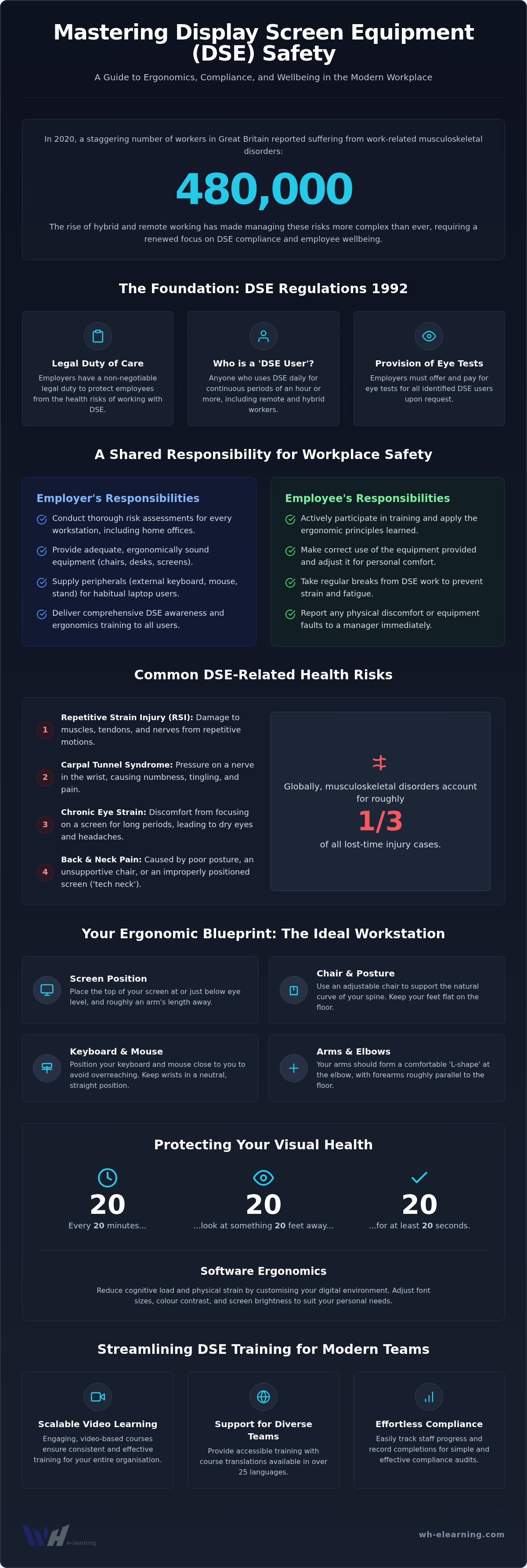
In 2020, 480,000 workers in Great Britain reported suffering from musculoskeletal disorders, and the move to hybrid working has only made managing these risks more complex. You likely find it challenging to determine exactly who qualifies as a DSE user when your team is spread across home offices, kitchen tables, and central hubs. Investing in a high-quality display screen equipment awareness course ensures your organisation meets the 1992 Regulations whilst protecting employees from the rising costs of repetitive strain injuries and lost productivity.
We understand that keeping up with health and safety standards shouldn't feel like a burden. This guide promises to help you master the essentials of workstation ergonomics and legal compliance with absolute confidence. We will walk through the latest HSE guidance for remote workers, explain how to manage training for diverse or multi-lingual teams, and show you a simple way to record staff progress for your compliance audits. By the end, you'll have a clear roadmap to create a safer, more efficient workspace for everyone in your business.
Key Takeaways
- Understand how the Health and Safety (Display Screen Equipment) Regulations 1992 apply to your business in 2026, including your legal duty to provide training and eye tests.
- Identify common ergonomic risks like RSI and carpal tunnel to protect your team’s health and maintain high productivity levels.
- Learn how to extend DSE compliance to home offices and hybrid setups, ensuring remote workers have the peripherals they need for safe habitual use.
- Discover how a modern display screen equipment awareness course can streamline your training process through scalable, video-based learning.
- Explore ways to track staff progress easily whilst supporting a diverse workforce with course translations in over 25 languages.
Understanding the Health and Safety (Display Screen Equipment) Regulations
The Health and Safety (Display Screen Equipment) Regulations 1992 form the backbone of workplace ergonomics in the UK. Whilst these rules originated decades ago, their 2002 amendments and subsequent HSE guidance have kept them vital for the 2026 professional landscape. Today, these regulations aren't just for office blocks. They apply equally to fixed workstations, home offices, and mobile sites where staff use digital devices for significant portions of their day. Employers have a non-negotiable legal duty to provide adequate training and offer eye tests to any staff member classed as a user.
Ignoring these duties carries heavy risks. Beyond the potential for HSE fines, businesses face the threat of civil claims related to musculoskeletal disorders. These injuries account for roughly one-third of all lost-time cases globally, making compliance a financial necessity rather than just a box-ticking exercise. By implementing a comprehensive display screen equipment awareness course, you protect your organisation from litigation whilst ensuring your team remains healthy and productive.
Who Qualifies as a 'DSE User'?
Identifying who needs training is the first step toward compliance. Generally, a 'user' is an employee who uses display screen equipment for a significant part of their normal work, typically defined as continuous spells of an hour or more on a daily basis. In 2026, it's easy to overlook 'casual' users, but even those who don't hit the one-hour threshold benefit from a display screen equipment awareness course to prevent poor habits from forming. You must identify DSE users amongst your hybrid and remote staff with the same rigour as your office-based team. If they work from home habitually, they fall squarely under the regulations.
Employer vs Employee Responsibilities
The law divides duties between the organisation and the individual to create a safer environment. Employers must carry out a thorough risk assessment for every workstation, ensuring that chairs, screens, and input devices meet ergonomic standards. This includes providing external peripherals for laptop users to prevent neck and back strain. Employees also have a role to play. They're responsible for following the ergonomic guidance provided during training and using the equipment as instructed. A key part of their duty is reporting any physical discomfort or equipment faults immediately, allowing the business to intervene before a minor ache becomes a chronic injury.
The Core Components of an Effective DSE Awareness Course
A high-quality display screen equipment awareness course does more than list rules. It provides practical solutions that employees can apply immediately to their daily routine. Under The Health and Safety (Display Screen Equipment) Regulations 1992, training must be comprehensive enough to reduce health risks effectively. This starts with identifying common ergonomic threats like Repetitive Strain Injury (RSI), carpal tunnel syndrome, and chronic eye strain. These conditions don't appear overnight. They develop through months of repetitive micro-movements and poor physical support. Slumping at a desk isn't just a bad habit; it's a productivity killer that compresses the spine and reduces lung capacity, leading to increased fatigue and frequent errors.
Maintaining visual health is equally critical for long-term wellbeing. Effective courses teach the 20-20-20 rule: every 20 minutes, look at something 20 feet away for at least 20 seconds. This simple habit reduces the constant strain on eye muscles caused by fixed-distance viewing. We also need to consider software ergonomics. Customising digital environments by adjusting font sizes, colour contrast, and screen brightness can significantly lower cognitive load and physical strain. A well-designed display screen equipment awareness course empowers staff to take control of these small but impactful settings.
Mastering the Ideal Workstation Setup
Achieving the perfect setup requires a few key adjustments to your environment. Your arms should form an 'L-shape' at the elbow, resting on a surface that allows your wrists to remain in a neutral position. Use an adjustable chair to support the natural curve of your spine and keep your feet flat on the floor. Position the top of your screen at eye level and about an arm's length away to avoid 'tech neck', a painful condition caused by looking down at devices for too long. Place your keyboard and mouse close enough to prevent overreaching, which is a major cause of shoulder and wrist fatigue.
Managing Breaks and Movement
Movement is just as vital as the quality of the chair you sit in. An effective course clarifies the difference between a 'break' and a 'change of activity'. Whilst a break involves stopping work entirely, a change of activity simply means moving from screen-based tasks to something else, like a phone call or physical filing. Incorporating simple desk stretches, such as neck rotations, shoulder rolls, and wrist flexes, keeps muscles supple and encourages healthy blood flow. Engaging with accredited health and safety training courses can help your team build these preventative habits into their daily work life.
Choosing the Right Training: Online E-Learning vs In-House Sessions
Selecting the most effective delivery method depends on your organisation's size and the specific needs of your workforce. For large, distributed teams in 2026, the scalability of online e-learning is unmatched. It allows hundreds of employees to complete a display screen equipment awareness course simultaneously without the logistical headache of booking meeting rooms or coordinating schedules. Digital certification is exceptionally cost-effective; it eliminates travel expenses and reduces the time staff spend away from their core duties. However, if you are looking to drive a major cultural shift or address complex site-specific risks, in-house health and safety training provides a personal touch that can be highly effective for leadership teams.
Quality assurance should be your top priority when reviewing providers. Always look for courses backed by CPD or RoSPA accreditation to ensure the content meets high industry standards. This level of validation gives you peace of mind that your training aligns with the latest HSE guidance on DSE. Choosing an accredited course isn't just about ticking a compliance box; it's about investing in a reliable partner for your team's long-term development.
The Benefits of Video-Based Learning
Modern video-based training has revolutionised how we digest safety information. Research consistently shows that video increases retention compared to static, text-heavy slides. It allows you to demonstrate physical adjustments, such as the correct way to tension a chair or position a monitor, through clear visual examples. This approach significantly reduces 'compliance fatigue' by replacing dense blocks of text with engaging, high-quality production. It makes the learning experience feel seamless and attainable for every professional, regardless of their technical background.
DSE Awareness vs DSE Assessor Training
It's vital to recognise the difference between general awareness and specialist assessor qualifications. A display screen equipment awareness course is designed for all staff members to help them manage their own workstations safely. In contrast, your management team or safety officers require DSE assessment training online to gain the skills needed to evaluate others' setups. By building an internal network of competent assessors, you ensure that self-assessments are reviewed by someone who can act on the findings. This balanced approach ensures your training programme covers both individual user knowledge and robust management oversight.
DSE Compliance in the Era of Hybrid and Remote Working
Managing workstation safety was once confined to the four walls of a central office. In 2026, those boundaries have shifted significantly. The Health and Safety Executive (HSE) has made it clear that your legal obligations follow your employees wherever they choose to work. Whether they are in a spare room or at a dedicated home desk, you must ensure their setup is safe and ergonomically sound. Habitual laptop use without an external keyboard, mouse, and monitor stand is a major risk factor for musculoskeletal issues. A modern display screen equipment awareness course provides remote staff with the practical knowledge to identify these hazards themselves.
Conducting assessments for a distributed workforce requires a proactive, digital-first approach. You cannot personally visit every home, so digital self-assessments have become the industry standard for compliance. These questionnaires allow a competent person to review setups remotely and intervene where necessary. This process ensures that every worker, regardless of their physical location, receives the same level of professional protection. Building this culture of safety shows your team that you value their long-term wellbeing. If you are ready to simplify this process for your global team, explore our accredited Health and Safety Training Courses to get started.
Mobile Devices and 'On-the-Go' Ergonomics
Professional work is no longer limited to traditional desks. Tablets and smartphones are now primary tools for many, yet they present unique ergonomic challenges that are often overlooked. Prolonged use often leads to neck strain and repetitive thumb injuries. Encourage your staff to use portable accessories like lightweight laptop stands and travel mice when working from cafes or trains. It is also vital to set clear boundaries. An "always-on" culture can lead to physical tension and mental burnout. Remind your team that taking regular breaks is a legal requirement, not a luxury.
The Hot-Desking Challenge
Shared workstations are a staple of the modern office hub. However, they only work if they are truly adjustable for every individual user. A chair set for a six-foot colleague will cause immediate strain for someone significantly shorter. Employees must develop the habit of "resetting" their station at the start of every shift. This involves adjusting seat height, back tension, and monitor position every single time they sit down. Standardising equipment across your office simplifies these adjustments. When every desk has the same intuitive controls, compliance becomes second nature for your team.
Streamlining Workplace Safety with WH eLearning
Implementing a robust display screen equipment awareness course across a modern organisation requires more than just high-quality content. It demands a platform that removes friction for both the user and the administrator. Our accredited business compliance e-learning solutions are designed to turn legal requirements into a seamless part of your team's development. By using a video-based approach, we simplify complex ergonomic concepts that can often feel dry or technical. This ensures your staff don't just watch the content; they understand and apply it to their daily routines, whether they're in a central hub or a home office.
Managing a global or diverse workforce from a single dashboard provides the quiet confidence you need to maintain high standards. Corporate licensing through WH eLearning allows you to deploy training at scale, ensuring that every employee receives consistent, high-quality instruction. This centralised approach eliminates the need for fragmented systems. It gives you a clear, bird's-eye view of your entire organisation's safety status without requiring deep concentration or navigating through dense blocks of text.
Inclusive Training for Global Teams
A truly inclusive safety culture leaves no one behind. Language barriers shouldn't be an obstacle to understanding fundamental health and safety rights. We've integrated accurate machine translation into our platform to support multi-language e-learning courses in over 25 languages. This ensures that every team member can engage with their display screen equipment awareness course in their first language, leading to better engagement and higher retention rates. It's a practical, forward-thinking way to support a diverse workforce whilst meeting your statutory duties as an employer in 2026.
Tracking Compliance and Progress
Maintaining a safe workplace is an ongoing commitment, not a one-time event. Our platform makes it easy to monitor course completion and assessment scores in real time, so you always know where your organisation stands. You can automate refresher reminders to ensure that workplace compliance training stays current for every staff member. When it's time for a health and safety inspection, you can generate audit-ready reports with just a few clicks. This level of automation reduces the administrative burden on HR managers and provides a reliable record of your dedication to staff wellbeing.
Empower Your Workforce with Future-Proof Ergonomics
Mastering workstation ergonomics is more than a legal requirement; it's a strategic investment in your team's long-term health and productivity. You've seen how the 1992 Regulations apply to every professional environment, from fixed office desks to kitchen tables. By addressing the hidden risks of habitual laptop use and hot-desking, you protect your organisation from civil claims whilst reducing the impact of musculoskeletal injuries. Clear, actionable training ensures that compliance becomes a natural part of your daily operations rather than a burden.
Our display screen equipment awareness course provides the clarity and tools needed to streamline this process across your entire business. We offer CPD Accredited certification and video-based learning to ensure high engagement and retention for every user. With translation available in 25+ languages, your global team can access vital safety information in their first language, fostering a truly inclusive culture of wellbeing. It's time to replace confusion with quiet confidence and professional growth.
Enrol your team in our accredited DSE Awareness Course today to simplify your compliance journey. We're ready to help you build a safer, more efficient future for your workforce.
Frequently Asked Questions
Is a display screen equipment awareness course a legal requirement in the UK?
Yes, providing a display screen equipment awareness course is a mandatory requirement under the Health and Safety (Display Screen Equipment) Regulations 1992. These rules apply if your staff use digital devices for continuous spells of an hour or more daily. Failing to comply can lead to HSE fines or civil claims. It's your responsibility to ensure every user understands how to organise their workstation safely to prevent long-term musculoskeletal disorders.
How often should staff repeat their DSE training?
There is no strict legal timeframe for retraining, but the HSE recommends refreshing knowledge whenever a workstation or job role changes significantly. Many organisations choose to repeat the training annually or bi-annually to maintain high safety standards. If an employee moves from an office to a hybrid setup, this constitutes a substantial change that triggers the need for a fresh display screen equipment awareness course to address new risks.
Does DSE training apply to employees working from home?
Yes, the regulations apply regardless of where the work takes place. If an employee habitually works from home, they qualify as a DSE user and require the same level of protection as office-based staff. You must ensure their home environment is ergonomically sound and provide necessary peripherals like keyboards or monitor stands. Remote workers often face unique risks, making specific training essential for their long-term health and productivity.
What is the difference between a DSE user and a DSE assessor?
A DSE user is any employee who uses digital screens as a significant part of their daily work. They need awareness training to manage their own setup. A DSE assessor, however, is a competent person trained to evaluate others' workstations and identify complex hazards. Whilst every user should complete a basic course, the assessor requires deeper technical knowledge to review self-assessments and suggest necessary equipment upgrades or adjustments.
Can we train our staff using online video-based courses?
Online video-based training is an excellent way to deliver consistent and engaging instruction to your team. It allows staff to see physical adjustments in action, which often leads to better retention than text-heavy slides. WH eLearning provides accredited, video-led modules that are accessible on any device. This flexibility is particularly useful for global teams, especially when combined with our machine translation features that support over 25 different languages.
What should be included in a DSE risk assessment?
A thorough assessment must cover the entire workstation environment. This includes checking the adjustability of the chair, the height of the screen, and the placement of input devices like keyboards and mice. You should also evaluate environmental factors such as lighting levels, room temperature, and noise. Finally, the assessment must consider the software interface to ensure it is easy to use and does not cause unnecessary mental fatigue or eye strain.
Do employers have to pay for eye tests for DSE users?
Employers are legally required to provide and pay for an eye test if a DSE user requests one. If the test shows that the employee needs special corrective appliances specifically for their DSE work, the business must also cover the cost of a basic set of glasses. This duty is a core part of the 1992 Regulations and helps prevent the chronic eye strain often associated with prolonged screen use.
How long does a typical DSE awareness course take to complete?
Most awareness courses are designed to be concise and efficient, typically taking between 30 and 45 minutes to complete. This allows employees to gain essential ergonomic knowledge without significant disruption to their working day. High-quality video modules often feel faster because they move logically through practical applications. Once finished, staff can immediately apply what they have learned to their own setup, providing an instant boost to workplace safety and comfort.


