

The fastest route to scalable e-learning for growing businesses may not be buying an LMS. As teams expand across locations and languages, training can become harder to organise, and managers may struggle to see who has started or completed required courses. More technology is not always the answer. A suitable course library or training provider may meet your needs with less complexity.
You need a repeatable way to train new starters and existing staff, assign relevant learning and monitor progress as your workforce changes. This guide explains how to assess whether you need a platform, a course library or support from a training provider, and what to check before rolling out a solution. It also covers how to keep delivery manageable as training needs grow, including when translated learning or face-to-face sessions may be useful. For example, WH eLearning offers more than 100 video-based workplace courses, with corporate licences that include administrative features for tracking progress and compliance status.
Key Takeaways
- Choose scalable e-learning for growing businesses by starting with learner roles and training objectives, then identifying the delivery and progress tracking you need.
- Compare course access, standalone LMS software and blended training before deciding what best fits your organisation.
- Use a staged rollout, beginning with a pilot group and assigning clear responsibility for course selection, learner communication and follow-up.
- Consider whether a course library and corporate access could support training across teams without adding unnecessary complexity.
- Explore how WH eLearning’s course library and corporate licences can support varied training needs, with administrative features for tracking progress and compliance status.
Why scalable e-learning matters as your business grows
Scalable e-learning is training delivery that can adapt as a workforce’s size, roles and learning needs change.
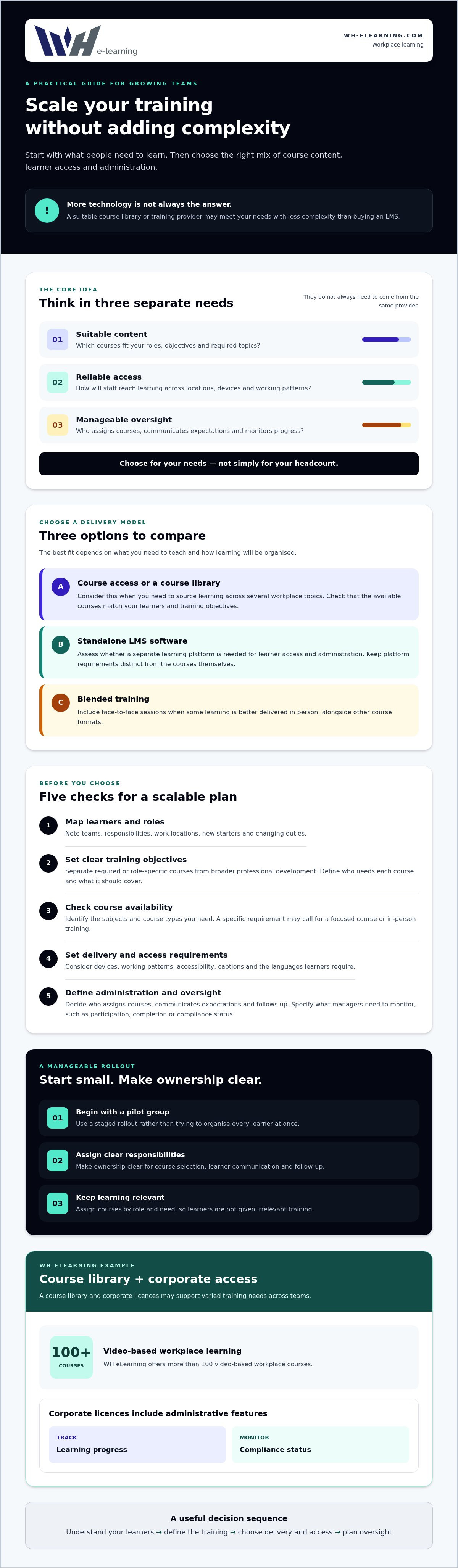
For a growing business, the practical challenge is keeping training organised as people join at different times, work in different places or take on new responsibilities. A repeatable approach helps employees find relevant courses when they need them and gives managers a clearer way to oversee participation. This does not automatically require a new software platform. Course supply, learner access and administration are separate needs, and they do not always have to come from the same provider.
Training also has a wider role than meeting immediate requirements. The distinction between short-term training and longer-term development is explored in Training and development, a useful perspective when deciding how learning can support an organisation as it changes.
What does scalable e-learning mean for a growing business?
Think of scalability as a practical combination of suitable content, reliable access and manageable administration. A new starter, for example, should be able to access relevant learning even if they begin after the main onboarding group. Someone moving into a different role may need a different course pathway, rather than the same set of learning as every colleague.
The right model depends on what you need to teach and how you will organise it, not simply on headcount. A small organisation with several sites or varied roles may have more coordination needs than a larger business with a consistent workforce. Before choosing a solution, separate the questions: which courses are needed, how will staff access them, and how will progress be monitored?
Which growth pressures make training harder to manage?
Hiring at pace can create a steady stream of onboarding needs, rather than one training event for everyone. When employees are spread across locations, managers may also need a consistent way to communicate course expectations and check who has completed assigned learning. If teams keep records differently, it can be harder to see participation clearly and follow up on gaps.
Differences in roles and languages add another layer. Office staff, supervisors and operational employees may need distinct course selections, while people working in different languages may need learning they can understand. A useful plan accounts for these differences without assigning irrelevant courses or making administration unnecessarily complicated. That is the central value of scalable e-learning for growing businesses: adapting access, content and oversight to workforce needs, rather than adding technology for its own sake.
How to assess scalable e-learning options before you choose
Start with what your people need to learn, then decide how that learning should be delivered and managed. This keeps the decision focused on business requirements rather than features you may not use. Use the steps below to compare options for scalable e-learning for growing businesses.
- Map your learners and roles. List the teams and job responsibilities involved, where people work and how often they need training. Note where new starters, changing duties or different locations create distinct learning needs.
- Set clear training objectives. Separate required or role-specific courses from broader professional development. For each course, define who needs it and what the training is intended to cover. For related planning considerations, see this business compliance e-learning guide.
- Check course availability. Identify the subjects and course types you need before comparing providers. A course library may suit organisations sourcing learning across several workplace topics, while a more specific requirement may call for a focused course or in-person training.
- Set delivery and access requirements. Consider how employees will access courses across devices and working patterns. Check accessibility needs, including captions, and identify the languages learners require. If some learning is better delivered face to face, include that in your criteria from the outset.
- Define administration and oversight. Decide who will assign courses, communicate expectations and follow up with learners. Specify what managers need to monitor, such as participation, completion or compliance status. Keep these requirements distinct from course content: a course provider and a standalone learning platform are not automatically the same purchase.
If you are comparing software, the LMS scalability guide offers further context on platform capacity as user numbers and course volumes change. Use it to inform your questions, but first confirm whether you need standalone software at all. Course access and administrative features offered through a provider’s corporate licensing may meet your needs.
Turn your answers into a short checklist and use the same criteria to assess each option. WH eLearning offers more than 100 video-based courses, with corporate licences that include administrative features for tracking employee progress and compliance status. Review WH eLearning course options to see whether the range aligns with your training requirements.
E-learning provider or LMS: compare what your business actually needs
A training provider and a learning management system (LMS) solve different problems. A provider supplies learning; an LMS is software for managing learning. Some organisations need one, others need both, and a course provider may include administrative features without selling standalone LMS software. Compare the options against your training and management requirements.
| Option | What it may provide | What to check |
|---|---|---|
| Course access | Ready-made courses relevant to your teams and roles. | Course range, format, accessibility, languages, learner access and what support is available. |
| Standalone LMS software | A software system for managing learning activity. | Whether it meets your administration needs, and how it handles integrations, data and technical standards. Confirm claims with the software provider. |
| Blended training | A combination of online courses and face-to-face learning. | Which topics suit each format, how sessions are arranged and who will manage learner follow-up. |
When might a course provider meet your needs?
Consider a provider when your priority is access to suitable workplace courses, rather than purchasing software to manage a wider learning programme. Review the course catalogue against your roles and objectives, then check the delivery format, device access, captions and language information. For broader planning context, read this workplace compliance training guide.
For example, WH eLearning offers more than 100 video-based courses across areas including health and safety, HR and business compliance. Its corporate licences include administrative features for tracking employee progress and compliance status. These provide course access and administration, rather than standalone LMS software. Machine-translated course content is available in more than 25 languages, but check whether it suits your learners’ needs.
When should you assess a standalone LMS?
Assess LMS software when you have specific management requirements that course access alone may not address. Write those requirements down before comparing providers. Ask about integrations with your existing systems, data handling and supported technical standards, and record any answer you have not independently verified. Clarify which reporting and support functions are included, rather than assuming every system provides the same features.
For scalable e-learning for growing businesses, the best fit is the option, or combination of options, that matches your course needs, learner access and administration workload. If those needs are straightforward, a course provider may be sufficient. If they are more complex, assess software separately and confirm how it would work alongside your chosen training provision.
How to roll out scalable e-learning across a growing team
A clear rollout gives employees a consistent starting point and helps managers identify where follow-up is needed. Begin with a manageable pilot, learn from the process, then extend access in planned stages rather than launching every course to everyone at once.
Build a manageable first-phase rollout
Choose a defined learner group, such as one team or location, and a small set of courses that match its roles. Before launch, assign an owner for course selection, someone to manage learner communications, and a manager or team lead to handle questions and follow up.
Make the first instructions simple and specific. Tell learners how to access their courses, which learning applies to them, what completion timeline to follow and who to contact if they need help. Give managers a clear follow-up process so reminders are consistent. Use the pilot to identify practical issues, such as unclear instructions or difficulty accessing learning on a particular device, before widening staff access.
Review progress and adapt the programme
Once learning is under way, review the information available to see where attention may be needed. Depending on the arrangement you choose, useful measures could include enrolment, course completion and outstanding training. Treat these as oversight indicators, not proof of a particular learning outcome. Agree who will check progress and how managers should respond to incomplete courses.
Then review whether courses still fit employees’ responsibilities and whether learners can access them in a suitable format. As teams, roles and locations change, revisit course assignments and gather feedback from learners and managers. If language access is a consideration, explore these multi-language e-learning courses. Check the available languages and whether the learning is appropriate for your employees, as machine translation does not necessarily provide full localisation.
Expand the programme when the pilot process is clear: learners know what to do, responsibilities are understood and managers can follow up using the available progress information. This staged approach makes scalable e-learning for growing businesses easier to review and adjust as needs shift, without assuming every team requires the same course or timetable.
WH eLearning’s corporate licences include administrative features for tracking employee progress and compliance status. Review WH eLearning course options as you plan a rollout that fits your teams.
How WH eLearning can support training as your business grows
A growing team may need relevant courses, a practical way to arrange access and clearer oversight of employee progress. WH eLearning brings these elements together through a workplace course library and corporate licensing options. This can help you assess whether course provision and associated administration fit your needs, without assuming you need to buy a standalone learning management system.
Match WH eLearning's training options to your team
The library includes more than 100 video-based courses across health and safety, HR, business compliance and other workplace topics. Individuals can enrol, while organisations can arrange bulk access through corporate licences. These licences include administrative features for tracking employee progress and compliance status, helping managers see where follow-up may be needed.
Courses are accessible on different devices and include closed captions. Machine translation is available in more than 25 languages, but it does not guarantee that every course is professionally translated or fully localised. Check the specific language and course details against your learners’ needs. If a topic is better suited to in-person delivery, in-house face-to-face training is also available.
These options may be relevant if you are comparing scalable e-learning for growing businesses across different teams, locations or roles. The right fit depends on the subjects employees need to study, how they will access learning and what oversight your organisation requires.
Plan your next step with confidence
Before making an enquiry, prepare a short outline of your requirements. Include:
- the number of learners and the teams or roles they belong to;
- the course topics you are considering and how access will be arranged;
- any language, device or accessibility needs, including whether closed captions are required;
- the progress or compliance-status information managers need to monitor; and
- whether in-house face-to-face training may suit any part of your programme.
This gives you a useful basis for discussing options and checking details. Confirm course-specific accreditation, available translations and delivery arrangements directly, as these can vary by course and requirement.
To discuss training for your organisation, get in touch about your growing team.
Build a training approach that can grow with your team
Scalable e-learning for growing businesses starts with clear training priorities, not an assumption that every organisation needs a new platform. Match courses to learner roles, decide how staff will access them, and choose an administration approach that gives managers a useful view of progress. A phased rollout lets you review what works for your teams and adapt as roles or workforce needs change.
WH eLearning offers more than 100 online workplace courses, with corporate access that includes administrative features for tracking employee progress and compliance status. Courses include closed captions and machine translation into more than 25 languages. Check specific language options and course details to confirm they meet your learners’ needs. In-house face-to-face training is also available when that format is a better fit.
Bring your course topics, learner numbers and access or administration requirements together before deciding on the next step. Discuss training for your growing team and explore an approach that fits your organisation. With clear priorities and the right level of support, you can build a manageable foundation for learning as your business grows.
Frequently Asked Questions
What is scalable e-learning for a business?
Scalable e-learning for a business is a way to provide training that can adapt as employee numbers, roles and learning needs change. It combines suitable course content, learner access and manageable administration. For example, new starters joining at different times should be able to access the learning relevant to their roles without waiting for a single group session. Scalability does not automatically mean buying an LMS; the right arrangement depends on what you need to deliver and manage.
How can a small business scale employee training?
A small business can scale training by identifying which roles need which courses, then setting a consistent process for assigning learning and following up. Start with a focused group or a small selection of relevant courses, and clarify who will communicate instructions and check progress. As needs grow, review the course range and access arrangements. Individual enrolment or bulk corporate access may be appropriate, depending on how many employees need training and how you want to organise it.
Does a growing business need an LMS for online training?
No. A growing business may need relevant online courses and a way to oversee participation, but that does not automatically require standalone LMS software. A course provider may offer access to learning and include administrative features, while an LMS is software for managing learning. First list what you need to assign, monitor and report. If those requirements go beyond the options available through a course provider, assess LMS software separately and check its capabilities before choosing.
Can e-learning support employees across different locations?
Yes. Online courses can give employees in different locations access to learning without requiring everyone to attend the same in-person session. Check that staff can access the courses using their available devices and that the format suits their working arrangements. Managers should also agree how course instructions, completion expectations and follow-up will be communicated across teams. For topics that benefit from in-person delivery, consider whether face-to-face training should complement the online learning.
How do businesses track employee e-learning progress?
Businesses can track progress using the administrative features available through their chosen training arrangement. Before selecting a provider or platform, clarify whether managers can see the information they need, such as employee progress or compliance status. Agree who will review it and how they will follow up on outstanding learning. For example, corporate licences from WH eLearning include administrative features for tracking employee progress and compliance status. Check the specific functions available before relying on them for oversight.
Can online training work for a multilingual workforce?
It can, provided the course language and format suit the learners. Check which languages are available for the specific course and whether captions or other accessibility features will help employees take part. WH eLearning courses include closed captions and machine translation into more than 25 languages. Machine translation does not necessarily mean a course is professionally translated or fully localised, so review the language details and suitability for your workforce before assigning training.
How should a business roll out e-learning to employees?
Start with a defined learner group and a small set of courses matched to their roles. Tell employees how to access learning, what they are expected to complete and the relevant timeline. Assign clear responsibility for course selection, learner questions and progress follow-up. Review enrolment, completion and outstanding training, then gather feedback and adjust the plan before expanding access. A staged rollout helps you identify practical issues early and adapt the approach as your workforce or training needs change.


