

What if the easiest training option leaves managers chasing completions and employees struggling to access the material? The right choice among corporate e-learning solutions UK organisations consider should make learning straightforward for staff and progress easier to monitor. Choosing a provider isn’t just about the size of its course library. The content must suit your training needs, fit your workforce and support the way you manage compliance.
It’s understandable to want clear evidence that employees have completed required learning without adding to already busy teams’ administrative workload. Access matters too: staff may need to learn on different devices, use captions or access translated content. Check what’s available for each course, as language options can vary.
This guide compares course quality, accessibility, administration and delivery options to help you choose with confidence. You’ll learn what to ask providers about course suitability, learner progress reporting and licence terms, as well as when online learning or in-house face-to-face training may suit your organisation. The aim is a practical choice that supports your people and makes training easier to manage.
Key Takeaways
- Match course topics to employees’ roles and learning objectives, then check accreditation and certificate details for each course.
- Compare individual enrolment, corporate licensing and in-house face-to-face training to find an approach that fits your workforce.
- When assessing corporate e-learning solutions UK providers offer, check how staff access courses and how administrators can monitor progress and compliance.
- Involve HR, compliance leads, line managers and representative learners when defining requirements and planning a rollout.
- Explore how WH eLearning’s 100-plus workplace courses, translated content and corporate licensing may support your training needs.
What should UK organisations expect from corporate e-learning solutions UK providers offer?
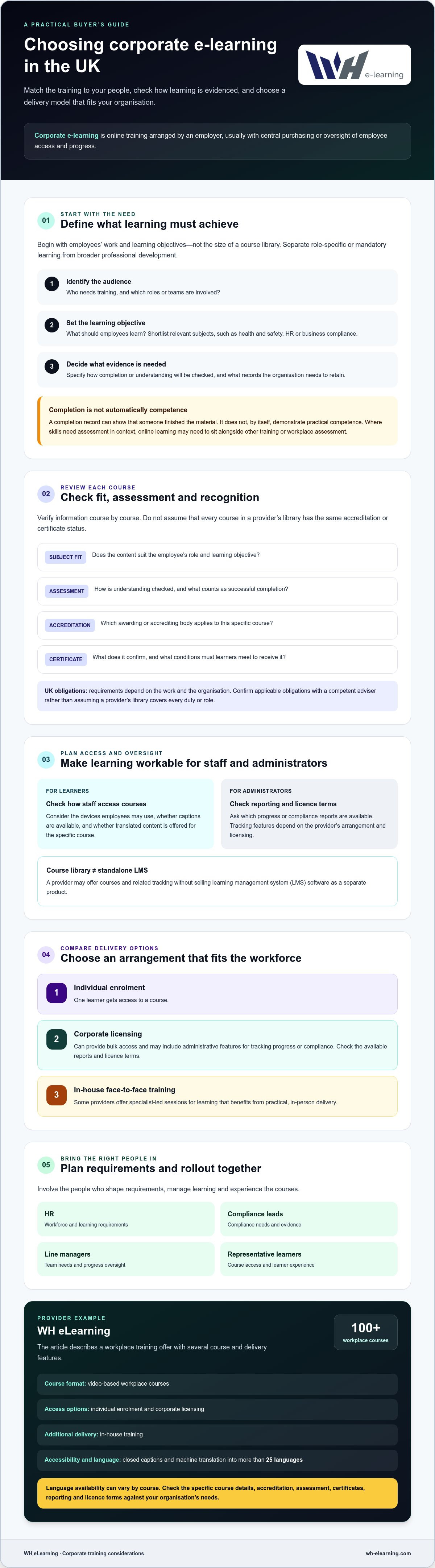
Corporate e-learning is online training arranged by an employer for its workforce, usually with central purchasing or oversight of employee access and progress. Unlike individual course access, it can help an organisation coordinate learning across teams and monitor participation, depending on the provider’s licensing and reporting features.
It sits within the wider field of educational technology, which covers tools and practices used to support learning. For buyers, the key question is practical: does the training suit the roles involved, the learning objectives and the evidence the organisation needs? A course completion record can show that someone finished the material, but it doesn’t automatically demonstrate practical competence. Where skills need to be assessed in context, online learning may need to sit alongside other training or workplace assessment.
When does an organisation need a corporate e-learning solution?
Centralised access can help employers organise onboarding, refresher learning and consistent training across teams or locations. Start by separating role-specific or mandatory learning from broader professional development. For each priority, identify who needs training, what they should learn and how you’ll check that it has been completed or understood.
Requirements depend on the work and the organisation. Confirm applicable UK obligations with a competent adviser rather than assuming a provider’s course library covers every duty or role.
What can a provider supply beyond online courses?
Offers vary, so check what each arrangement includes. Individual enrolment gives one learner access to a course. Corporate licensing can provide bulk access and may include administrative features for tracking progress or compliance. Ask which reports are available and review licence terms before relying on a particular feature. Some providers also offer in-house face-to-face sessions for learning that benefits from practical, specialist-led delivery.
A course library is not the same as standalone learning management system (LMS) software. A provider may supply courses and related tracking without selling an LMS as a separate product. WH eLearning, for example, offers more than 100 video-based workplace courses, individual enrolment, corporate licensing and in-house training. Its courses include closed captions and machine translation into more than 25 languages. Check language availability for the specific course.
For a closer look at selecting training for workplace requirements, consult a workplace compliance training guide alongside this buying advice. The right corporate e-learning solutions UK organisations choose should align course content, delivery and evidence with their workforce’s actual needs.
Which course, access and support features matter most in the UK?
Start with the work employees do, not the size of a provider’s course catalogue. Map priority roles to learning objectives, then shortlist relevant subjects such as health and safety, HR or business compliance. A course should address the knowledge employees need and fit the evidence your organisation expects to retain. When comparing corporate e-learning solutions UK providers offer, verify claims against current information for each course instead of relying on general statements about a library.
How should buyers assess accreditation and course quality?
Check accreditation course by course. Ask which awarding or accrediting body applies, what the assessment involves and what conditions learners must meet to receive a certificate. Confirm the certificate’s exact status and relevance to the role or objective. Don’t assume that every course from one provider carries the same accreditation. If you’re considering a safety course, compare its current details with your organisation’s needs before selecting it.
Use this checklist when reviewing course information:
- Subject fit: Does the content reflect the employee’s role and learning objective?
- Assessment: How is understanding checked, and what counts as successful completion?
- Recognition: Is the named accreditation or awarding body confirmed for this course?
- Certificate: What does it confirm, and are there conditions for earning it?
Also ask what learner help is included, how to contact support and whether any assistance or arrangements sit outside the course. Get answers in writing when they affect your rollout.
Will the training work for a diverse, distributed workforce?
Test the learner experience on the devices staff are likely to use, including work computers and mobile devices. Ask about captions, accessibility information and technical requirements. Consider employees on different shifts, remote workers and those who may need guidance using digital learning. A convenient format is only useful if people can access and follow it.
Check language support at course level, too. Ask which languages are available and whether translation applies to spoken content, captions or other course materials. WH eLearning’s video-based courses include closed captions and machine translation into more than 25 languages, though options may vary by course. You can explore WH eLearning’s online courses as one option to assess against your requirements.
How do corporate e-learning delivery models compare?
The right format depends on who needs training, where they work and how much coordination your team can manage. Individual enrolment can suit a small number of learners, while corporate licensing may help when several employees need access and managers need to monitor progress. In-house face-to-face sessions offer a different setting for specialist-led discussion or practical learning.
| Delivery model | Audience and administration | Learning context and preference |
|---|---|---|
| Individual enrolment | One learner or a small number. Access and completion may need to be followed up individually. | Online learning for someone who needs a specific course and can study independently. |
| Corporate licensing | Multiple employees. Administrative features may support assignment and progress or compliance tracking. Confirm what’s included. | Online learning for teams, including staff working across different locations or schedules. |
| In-house face-to-face sessions | A group attending a planned session. Organisers need to coordinate timing and location. | Specialist-led learning where discussion, interaction or practical context is valuable. |
These are broad distinctions, not a guarantee that every provider’s offer works the same way. Ask for the relevant licence terms and any additional requirements before comparing options. Don’t assume one model will cost less overall. Consider the time needed to organise training, support learners and manage records alongside the provider’s terms.
When does bulk corporate licensing make sense?
Bulk access may be a practical fit if several employees need relevant courses, particularly when your organisation wants a clearer view of participation. Ask how administrators assign or manage access, what progress and compliance information they can see, and whether reporting meets your needs. Confirm the licence scope, eligible learners, access period and renewal terms before agreeing a rollout.
When might in-house training complement online learning?
Face-to-face learning may suit teams that benefit from direct discussion or practical, specialist-led sessions. Compare the time and coordination needed for travel, scheduling and location with the flexibility of online access, especially for shift-based or dispersed teams. A blended approach can be useful when different subjects call for different formats. For safety training, compare the online and in-house health and safety training options against your team’s learning objectives.
When assessing corporate e-learning solutions UK providers, focus on fit: course requirements, staff distribution and the administrative capacity available to support learners.
How can UK buyers evaluate providers before choosing?
A clear selection process helps you compare providers against your organisation’s needs, not just their course catalogues. Involve HR, compliance owners, line managers and a small group of representative learners. They can flag role-specific requirements, administrative concerns and access barriers before a decision is made.
Use these five steps to structure your evaluation:
- Define needs: Identify learner groups, objectives, required evidence and your team’s capacity to administer training.
- Shortlist topics: Prioritise courses that match employee roles and current training priorities.
- Verify course details: Check course-specific accreditation, assessment, certificate conditions and access terms.
- Test administration: Confirm how learners are assigned and what progress or completion information administrators can view.
- Agree rollout: Set responsibilities, communications, timing and how you’ll review results.
Where a provider makes a sample or pilot available, use it to check the learner experience and administrative process before wider adoption. Record your decision criteria and unanswered questions, then compare provider responses against the same list. This makes it easier to spot gaps and clarify assumptions before agreeing terms.
What questions should a corporate buyer ask providers?
Ask which courses match your employees’ roles and learning objectives. Request current details of accreditation, assessment methods, certificates and access conditions for each course under consideration. Clarify what reporting administrators receive, which languages are available, what devices or technical requirements apply, and what learner support is included. Ask providers to distinguish included features from anything that needs a separate arrangement.
How should buyers plan rollout and measure progress?
Assign an owner to allocate courses, explain expectations and follow up with learners. Agree how line managers will support completion and who will review outstanding training. Choose practical measures that match your goals, such as enrolments, completions and courses still outstanding. Completion figures show participation, but should be considered alongside learner feedback and evidence that the training met its intended objective.
Review feedback and outcomes before expanding the programme. If learners report access difficulties or managers find tracking unclear, resolve those issues first. A measured rollout gives your organisation a chance to refine the process before more teams join.
To assess whether corporate e-learning solutions UK buyers consider align with your requirements, explore WH eLearning’s organisational training options, including online courses, corporate licensing and in-house face-to-face training.
How can WH eLearning support corporate training in the UK?
WH eLearning offers more than 100 video-based online courses across workplace compliance, HR, health and safety, and related topics. Organisations can consider individual course access for specific learners or corporate licensing when training needs to reach employees across a workforce. Corporate licensing includes administrative features for tracking learner progress and compliance status, helping training leads maintain oversight without treating course access as a standalone learning management system.
Access is another practical consideration. Courses can be accessed on any device and include closed captions and machine translation into more than 25 languages. These features can support employees who prefer captions or need translated content, although language options may vary by course. For learning that benefits from direct discussion, industry specialists can also deliver in-house face-to-face sessions. This can complement online courses where appropriate, rather than being necessary for every training plan.
What should organisations confirm about WH eLearning courses?
Review each course against the roles and objectives in your training plan. Confirm current course content, accreditation, assessment method and certificate conditions before choosing. Check language availability for the specific course, as well as access and licence conditions for the employees who will take it. This course-by-course review helps ensure the learning suits your workforce instead of relying on broad assumptions about a provider’s catalogue.
What is the next step for a corporate training enquiry?
Prepare a short outline of your requirements before making an enquiry. Include:
- Expected learner numbers and the employee groups to be trained.
- Priority subjects, roles and learning objectives.
- Reporting needs, including the progress or compliance information administrators need to monitor.
- Preferred delivery approach, such as online access, corporate licensing or in-house face-to-face sessions.
- Questions about course-specific accreditation, assessment, certificates, language availability and licence terms.
These details give you a useful starting point for discussing suitable course options and available administrative features. As you compare corporate e-learning solutions UK providers offer, confirm the relevant terms and course information directly before making a decision.
Discuss your organisation’s e-learning requirements with WH eLearning to explore options for your workforce.
Choose training that fits your workforce
The right corporate e-learning solutions UK organisations choose should match course content to job roles, give employees practical ways to access learning and make progress easier to oversee. Compare delivery models with your team’s needs, and check accreditation, assessment, certificates and licence terms course by course. Completion records are useful, but consider what further evidence may be needed to assess understanding or competence.
WH eLearning offers more than 100 online workplace courses across areas including HR, business compliance, health and safety, and related subjects. Corporate licensing includes administrative features for tracking learner progress and compliance status. Courses also include closed captions and machine translation into more than 25 languages, although language options may vary by course. In-house face-to-face sessions are another option where specialist-led learning suits your objectives.
Bring your priority topics, expected learner numbers and reporting needs to the conversation. Discuss your organisation’s e-learning requirements and explore which options may suit your training plan. With clear requirements and the right checks, you can take a confident next step towards training that works for your people.
Frequently Asked Questions
What are corporate e-learning solutions?
Corporate e-learning solutions help organisations provide online training to employees, with features that vary by provider. They may include course access, bulk licensing and administrative tools for monitoring learner progress. Course delivery isn’t necessarily the same as standalone learning management software. Start by identifying who needs training and what they need to learn, then check course suitability, assessment, access arrangements and the reporting available to administrators.
How do I choose a corporate e-learning provider in the UK?
Start with the roles, subjects and learning outcomes your organisation needs to support. Compare course content, course-specific accreditation, assessments and certificates, then check device access, accessibility features and language options. Ask what administrator reports and learner support are included, and clarify licence terms. Review sample content if available. For UK requirements, confirm relevant obligations with competent advisers rather than assuming one course or provider meets every organisational need.
Can corporate e-learning help track employee training?
Yes, if the provider’s corporate offer includes reporting that meets your organisation’s needs. Ask what administrators can view, such as enrolments, progress, completions or compliance status, and how they access the information. Check whether reports can be exported and how long records remain available. WH eLearning’s corporate licensing includes administrative features for tracking employee progress and compliance status. Confirm the specific reporting features and licence terms before relying on them.
Is online training suitable for every employee?
Not always. Suitability depends on the course, job role, access needs and whether practical instruction is important. Online learning can provide a flexible way to study, whilst some teams or subjects may benefit from specialist-led, face-to-face sessions. Check device access, captions, course language options and assessment methods. Before a wider rollout, consider asking representative employees to review sample learning, if available, and share feedback on its clarity and accessibility.
What is the difference between corporate licensing and individual course enrolment?
Individual enrolment gives a learner access to a specific course, whilst corporate licensing is designed for organisations arranging training for employees in bulk. The number of eligible learners, access period, course scope and administration features depend on the provider’s terms. Ask for these details in writing, including how progress is monitored, then check that the available courses match your workforce’s roles and learning objectives before comparing proposals.
Are corporate e-learning courses accredited?
Some courses may be accredited, but don’t assume accreditation applies to every course in a provider’s library. Check the specific course, named awarding or accrediting body, assessment requirements and certificate conditions. If recognition matters for a role or organisational requirement, confirm the current status with the provider and relevant authority. WH eLearning provides workplace courses, but buyers should verify the accreditation and certification details for each course they’re considering.
Can online workplace training be delivered in multiple languages?
Some providers offer translated or multilingual courses, but language availability can vary by course. Ask which languages are offered and whether translation covers the learning content, captions, assessments and supporting materials. WH eLearning describes machine translation into more than 25 languages and closed captions for its video-based courses. Confirm the options for each course and consider whether learners may need translated instructions or additional help accessing the training.
Does WH eLearning sell standalone LMS software?
No. WH eLearning provides online training courses and corporate licensing, which includes administrative features for tracking staff progress and compliance status. It doesn’t sell standalone learning management software for managing unrelated training content. If your organisation needs a separate LMS, assess that requirement independently from course access. During provider discussions, clarify which courses, licensing arrangements and administrative features are included, and check whether they meet your organisation’s training and reporting needs.


