

A new starter signs in from home, but isn’t sure who to ask about a safety concern, where to find key procedures or how their role fits into the wider team. Online induction training for remote employees can provide clear, consistent guidance, but it works best when digital learning is supported by real conversations and role-specific follow-up.
Remote induction needs to do more than share policies and tick off training. New employees need a warm welcome, clear expectations and reliable routes to support, without being expected to absorb everything in one sitting. Short, accessible learning they can revisit makes essential information easier to use in the flow of work.
This practical guide explains how to plan an online induction from before day one onwards. You’ll learn how to structure learning around the role, explain safety, security and reporting procedures, build in manager and team contact, and make materials accessible across a distributed workforce. We’ll also cover how to track progress and improve the experience over time, so every new starter has a clear foundation and feels connected.
Key Takeaways
- Build online induction training for remote employees around organisation-wide essentials, role-specific guidance and practical remote-work procedures.
- Pair self-paced learning with manager conversations and team introductions to make the experience more personal and connected.
- Plan induction from before day one through the first month, with a clear owner and next step at each stage.
- Make learning easier to access with clear, revisitable materials and suitable accessibility features.
- Use completion records, assessment responses and employee feedback to spot gaps, while remembering that completion alone doesn’t demonstrate confidence or competence.
Why online induction training for remote employees needs more than a welcome email
A welcome email can make a new starter feel expected, but it can’t explain how work gets done, who makes decisions or where to turn when something goes wrong. In an office, people often pick up these details through quick conversations and observation. Remote employees may not see those interactions, so online induction training for remote employees needs to make essential context clear from the start.
Online induction is a planned introduction to an organisation, a role, its people, tools and working expectations. Its purpose is to give employees the foundations they need to begin safely, understand how to get support and feel part of the team. A useful overview of the benefits of a well-structured induction programme also highlights why this introduction should be organised rather than left to chance.
Induction and onboarding are connected, but they aren’t interchangeable. Induction establishes the essentials: the organisation’s purpose, key procedures, role boundaries and ways of working. Onboarding continues beyond that first introduction, supporting the employee as they develop skills, take on responsibilities and settle into the role. Treat induction as the starting point of a longer journey, not a one-day information dump.
What can go wrong when remote induction is left to chance?
Without a shared plan, new starters can be left guessing which tasks matter most, how quickly colleagues expect a reply or whether a question belongs with their manager, HR or IT. Even basic processes, such as reporting a safety concern or finding the latest procedure, can feel harder when the employee doesn’t know where information lives.
Relying on each manager to cover everything can also create uneven introductions. One employee might receive clear guidance on team communication and support routes, whilst another hears only about immediate tasks. A simple induction checklist helps managers deliver the same core information, then add relevant detail for the specific role and team.
What should a remote employee feel after induction?
By the end of the initial induction, a new starter should have a practical map for getting started, not be expected to know everything. They should be able to explain their main responsibilities, locate essential resources and identify the right person or channel for help. They should also understand the agreed working hours, communication norms and how to raise a safety issue.
- Role clarity: Know the first priorities and how work will be discussed.
- Practical confidence: Find key tools, guidance and support routes.
- Connection: Recognise who is in the team and how to communicate with them.
These outcomes create a sense of direction and belonging, but they don’t mark the end of support. Managers should keep checking in as the employee encounters new situations, clarify expectations and make space for questions. Induction provides a reliable foundation; ongoing conversations help turn that foundation into confident, capable participation in the team.
What to include in online induction training for remote employees
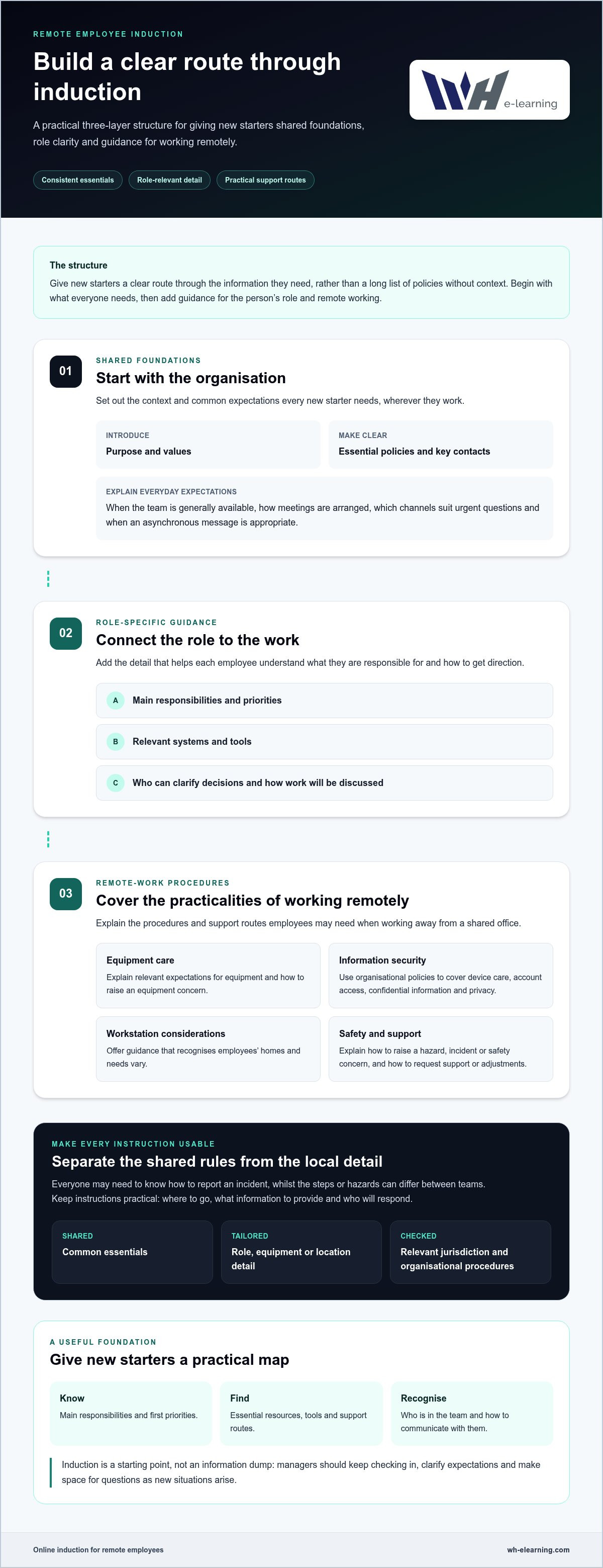
Give new starters a clear route through the information they need, rather than presenting a long list of policies without context. A practical structure for online induction training for remote employees has three layers: shared foundations, guidance for the individual role, and procedures for working remotely. This keeps core messages consistent whilst allowing managers to add detail that reflects the work and location.
Start with the organisation’s purpose, values and key contacts. Then explain what the employee is responsible for, how their work will be prioritised and which tools they’ll use. Make everyday expectations explicit: when the team is generally available, how meetings are arranged, which channels suit urgent questions and when an asynchronous message is appropriate. Don’t assume a new starter will infer these norms from a calendar invitation or chat thread.
- Shared foundations: Organisation purpose, essential policies, key contacts and common working expectations.
- Role-specific guidance: Main responsibilities, priorities, relevant systems and who can clarify decisions.
- Remote-work procedures: Equipment care, information security, privacy, workstation considerations and reporting routes.
Separate universal material from content that depends on the role, equipment or location. For instance, everyone may need to know how to report an incident, whilst the reporting steps or hazards may differ between teams. Before describing a legal duty or setting a formal requirement, check the relevant jurisdiction and the organisation’s own procedures. Keep employee-facing instructions practical: where to go, what information to provide and who will respond.
Which safety and security topics belong in a remote induction?
Explain how to raise a hazard, incident or equipment concern, including the appropriate workplace channel and the person responsible for receiving it. Cover workstation set-up as guidance, not a single prescribed arrangement: employees’ homes and needs vary. Include reminders about breaks and how to request support or adjustments. For security, use the organisation’s policies to explain device care, account access, confidential information and privacy. Clear examples help employees recognise what to do without guessing.
How can induction help remote starters feel part of the team?
Introduce the manager and key colleagues, explain what the team does and show where everyday questions belong. Set out expectations for meetings, response times, availability and decisions that can be handled asynchronously. Include practical information about accessing wellbeing support, while making clear that a module can’t replace a conversation with a manager or colleague. A named contact and a planned check-in give new starters a straightforward way to raise concerns as they arise.
Keep foundational learning easy to revisit. Video-based courses can support consistent delivery across distributed teams, while closed captions and machine translation can improve access for learners. For example, online health and safety courses can form one part of a wider induction, alongside role guidance and direct manager contact.
Does online induction feel impersonal? Make digital learning engaging and accessible
It can. If a new starter’s only contact is a sequence of online modules, induction may feel like information delivered at a distance. That doesn’t make digital learning the problem. It means online induction training for remote employees should pair the flexibility of self-paced learning with the reassurance and context that people provide.
Each format has a distinct role. Digital modules can explain shared information consistently and let employees learn at a suitable pace. A manager can interpret expectations for the role, answer questions and check understanding. Team introductions help a new colleague connect names to people and see how their work fits. Use all three, rather than expecting a course to create connection on its own.
Approach
What it does well
What to add
Self-paced modules
Deliver consistent foundational information employees can revisit around their work.
Offer a named contact for questions and clarify where each topic applies to the role.
Manager conversations
Connect guidance to the employee’s responsibilities and give space to clarify priorities.
Share core messages with managers so key information stays consistent.
Team introductions
Put faces and responsibilities to names, and make everyday collaboration easier to understand.
Explain how to join discussions and ask colleagues for help.
How do you keep online induction clear and engaging?
Use plain language, concise modules and examples that reflect real situations in the employee’s role. Break a longer subject into manageable sections, explain why it matters and finish each part with a clear next action. A short knowledge check can prompt reflection: ask what the employee would do in a scenario, then explain the reasoning. This makes a check more useful than simply recording that a page was completed.
How can an employer make digital induction more accessible?
Give clear access instructions and make learning usable across devices, so employees can get started without avoidable technical friction. Captions and translated learning can support different access needs. WH eLearning offers video-based courses accessible on any device, with closed captions and machine translation into more than 25 languages. Explore multi-language e-learning courses as one way to support language access.
Accessibility also depends on what happens around the module. Allow time for questions, provide a human contact for clarification and invite employees to say when instructions or formats aren’t working for them. This feedback can help improve the learning experience whilst keeping personal guidance part of induction.
Organising Remote Induction: Day One to Month One
A clear timeline helps employees know what to expect and gives managers a practical way to share responsibility. For effective online induction training for remote employees, assign one accountable owner to each stage and tell the new starter what happens next. Adapt the schedule to the role, location and organisation’s procedures.
- Before day one, owner: the hiring manager. Send a concise schedule, explain where learning takes place and name the person to contact with questions. Prepare relevant account access, equipment guidance and essential policy materials. Prioritise what the employee needs to begin; explain when further information will follow instead of sending a large document pack without context. Employee’s next step: review the schedule and follow the access instructions.
- On day one, owner: the line manager. Welcome the employee, check that essential access works and explain the immediate priorities. Introduce the people they’ll work with and outline how to raise an urgent question. Keep the first day manageable, with space to pause and clarify unfamiliar terms or processes. Employee’s next step: confirm access and note any questions or blockers to discuss.
- During the first week, owner: the line manager. Combine self-paced learning with focused conversations about the role. Discuss how priorities are set, what good work looks like in the employee’s context and where procedures apply in practice. Allow time for relevant foundational learning, such as workplace safety training courses, alongside role-specific guidance and manager contact. Employee’s next step: apply the guidance to an initial task and raise anything that remains unclear.
- By the end of the first month, owner: the line manager. Review progress in a planned conversation. Invite the employee to identify unanswered questions, access difficulties and areas where role expectations still feel uncertain. Use learning progress to spot outstanding material, then discuss understanding directly rather than treating completion as proof of competence. Agree any further guidance, practice or support needed. Employee’s next step: share feedback and agree priorities for continued development.
What should happen before a remote employee’s first day?
Give the employee a simple route into the induction: a schedule, clear access instructions, equipment guidance and a named support contact. Make essential policies easy to find, but introduce them in a useful order. For example, share what’s needed to start safely first, then explain when other material will be covered. A prepared welcome reduces avoidable friction without asking a new starter to absorb everything at once.
How should managers follow up after online induction?
Use check-ins to discuss real questions, not just course status. Ask what’s clear, where the employee needs an example and whether any tools or instructions are getting in the way. Learning records can help managers identify unfinished content, but conversation reveals whether the employee can apply it. Build a consistent learning pathway with relevant online health and safety courses as part of the wider induction, supported by role-specific coaching.
How to measure and improve online induction for remote employees
Good measurement helps you see where induction is clear and where employees need more support. For online induction training for remote employees, combine learning records with feedback and manager conversations. Each provides a different signal: records show participation, feedback highlights the learner’s experience, and discussion helps explore how well guidance makes sense in the role.
Which induction measures are useful without creating paperwork for its own sake?
Track only information that helps you decide what to do next. A compact review can include assigned learning and completion status, responses to knowledge checks, common questions, and short employee feedback on clarity, relevance and accessibility. If several starters ask where to report an issue, for example, make that route easier to find. Avoid collecting data simply because it’s available.
- Completion status: Identify outstanding learning and arrange follow-up where needed.
- Assessment responses: Spot topics that may need clearer explanations or another example.
- Questions and feedback: Find confusing instructions, access barriers or unanswered concerns.
- Manager conversations: Explore whether employees can apply guidance to their work.
Completion records show that a learner took part in assigned material. They don’t, on their own, prove confidence or workplace competence. A quiz can check recall, but it may not show whether someone can recognise when a procedure applies or explain how they’d use it. Managers can close that gap with a focused question about a realistic work situation, then agree any further practice or clarification.
How can an organisation keep induction relevant as work changes?
Assign an owner to review each part of the induction and update it when relevant procedures, equipment, roles or organisational expectations change. That owner should also tell affected employees what has changed and where to find the current guidance. Ask managers to share recurring questions during reviews: repeated uncertainty can indicate that material needs a clearer example, not simply another reminder to read it.
Keep the review practical. Check that learning still reflects the work employees do, that links and access instructions remain useful, and that role-specific guidance hasn’t become outdated. Consider jurisdiction-specific requirements before changing any formal safety or compliance instructions. Related workplace compliance training can also support a broader learning approach, alongside manager guidance tailored to each role.
Online learning can make shared foundations easier to deliver and monitor across a distributed workforce. WH eLearning offers organisations bulk access to courses, with administrative tracking of learner progress and compliance status. Use that tracking as one part of a wider induction plan, not as a replacement for conversation or role-specific follow-up. Explore online courses for your induction plan and choose learning that supports the foundations employees need.
Make your next remote induction a stronger start
Use the next new starter’s experience to test whether your induction feels clear from their perspective, not just complete on paper. Choose one outcome you want them to reach, then make sure the learning, manager support and follow-up all help them get there. This keeps online induction training for remote employees focused on a meaningful start, rather than a checklist of tasks.
After each new starter has settled in, ask what helped them feel ready and what would have made the experience easier. A small, considered improvement can make the next welcome more personal and useful. Keep the process practical, listen to the people taking part and refine it as your team’s needs change.
For learning that can support a structured induction, explore WH eLearning’s online training courses. Choose a relevant next step for your team, then build the human guidance around it. A thoughtful first experience gives remote employees a clearer path to contribute and grow.
Frequently Asked Questions
What should online induction training for remote employees include?
Online induction training for remote employees should cover the information they need to begin their work safely and with clear expectations. Prioritise what applies to everyone, then add role- or location-specific guidance. To check coverage, ask: could a new starter find the current procedure, identify who owns a decision and explain what to do if something goes wrong? Use relevant scenarios to make key information easier to apply.
When should remote employee induction start?
Start preparing before the employee’s first working day, so access instructions and essential materials are ready when they need them. Share the schedule and explain how to get help with access problems. Keep the first-day workload realistic, then introduce information in a useful order as the employee settles into their role. This gives them a clear starting point without asking them to absorb every policy and process at once.
Can online induction training work for employees in different countries?
Yes, online learning can provide a consistent foundation for a distributed workforce, with local guidance added where practices or requirements differ. Separate shared organisational information from country-specific procedures, and have the relevant internal owner review local content before it’s assigned. Consider language and accessibility needs too. WH eLearning offers machine translation into more than 25 languages, helping organisations support language access across their workforce.
How do you make remote employee induction engaging?
Give learners something to do with the information, not just something to watch or read. For example, after explaining a reporting process, ask what action they’d take in a short workplace scenario and why. Keep instructions focused, make the next step obvious and provide a way to raise questions. Follow learning with a manager or colleague conversation, so employees can connect general guidance to the situations they’re likely to face.
How can employers check whether remote induction has been completed?
Use a record of assigned learning and completion status to see what’s outstanding and where follow-up may be needed. Corporate course access from WH eLearning includes administrative progress and compliance tracking. Keep that record proportionate and handle it according to your organisation’s processes. Completion confirms participation, not understanding, so pair it with a brief discussion or role-based question to explore whether the employee can use the guidance in practice.
How long should online induction training for remote employees take?
There’s no single duration that suits every role. Set the length according to the information employees need immediately, the complexity of their work and any role-specific learning they’ll need later. Break content into manageable sessions and allow time to practise, ask questions and complete work-related tasks. If a starter repeatedly needs to pause or revisit unclear sections, review the structure and instructions rather than assuming they need to move faster.
Does online induction replace a manager’s welcome and check-ins?
No. Digital learning can deliver shared information, but it can’t replace a manager’s welcome, context or ongoing support. A manager helps the employee understand how guidance applies to their responsibilities and creates space to discuss questions that may not fit neatly into a module. Keep check-ins purposeful: ask what’s unclear, what feels different from expectations and what support would help with the next task.


