

A bulk employee course enrolment platform lets administrators assign training to groups, manage invitations or self-registration, and track completions. For mandatory training, assign courses directly rather than relying on staff to remember to enrol. Keep completion and training-hour records organised to support licensing documentation.
Getting everyone onto a course is only the first step. Administrators also need to monitor progress and keep records useful afterwards. This guide explains how to set up bulk enrolment, decide when staff can enrol themselves, and track completions. It also covers training hours, renewal planning and licensing records, so course administration does not become a separate task for every employee.
Key Takeaways
- Choose between CSV import, HR system sync and manual selection to enrol groups in a way that fits your staff records.
- Assign mandatory training directly, then use completion records to monitor progress and prepare licensing documentation.
- Use administrator invitations for controlled training and self-registration when learners need to choose optional courses.
- Plan renewals ahead of expiry and keep training hours and course records organised as staff training needs change.
How can I track completions, reassign hours, and stay ready for licensing?
Use assigned training, regular progress checks and organised records to follow mandatory learning through to completion. A renewal schedule helps you prepare licensing documents before training expires.
-
Set up mandatory compliance tracking
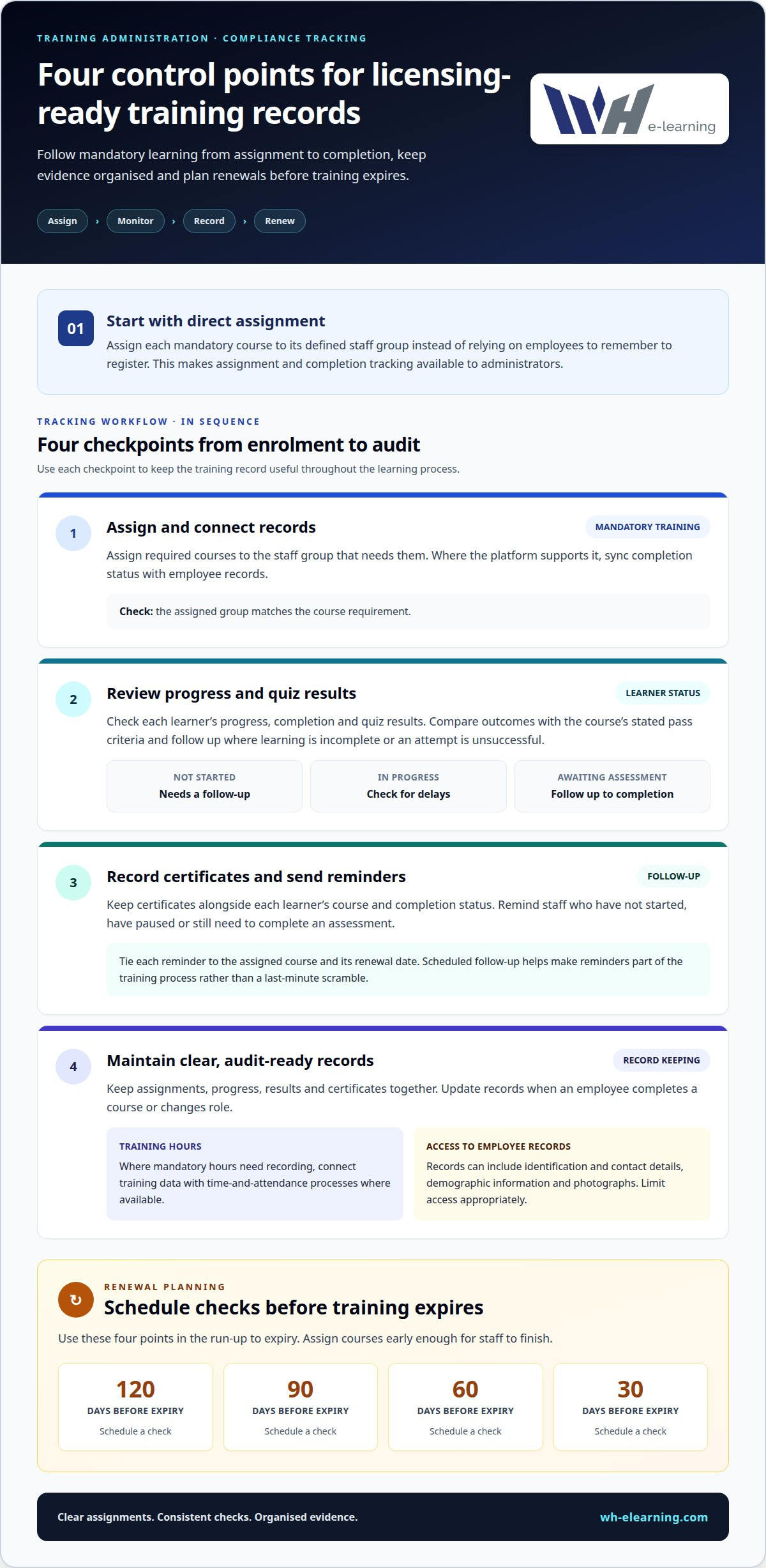
Assign each required course to its defined staff group, rather than relying on employees to remember to register. This gives administrators access to assignment and completion tracking. Sync completion status with employee records where the platform supports it. For renewals, schedule checks 120, 90, 60 and 30 days before expiry, then assign courses early enough for staff to finish.
-
Track course progress and quiz results
Review each learner’s course status, including progress, completion and quiz results. Separate those who have not started from learners still in progress or awaiting a final assessment. Compare quiz outcomes with the course’s stated pass criteria, then follow up on incomplete learning or unsuccessful attempts. Regular reviews help you spot delays early enough to address them.
-
Track certificates and send completion nudges
Record certificates alongside each learner’s course and completion status. Use reminders for staff who have not started, have paused or still need to complete an assessment. Tie each message to the assigned course and its renewal date. Scheduled follow-up makes reminders part of the training process, rather than a last-minute scramble before a licensing review.
-
Keep audit-ready compliance records
Keep clear records of assignments, progress, results and certificates. Update them when an employee completes a course or changes role. If you need to record mandatory training hours, connect training data with time-and-attendance processes where available. According to the Office of the Federal Register, National Archives and Records Administration, employee records can include Social Security Numbers, identification numbers, contact details, demographic information and photographs. Limit access to these records appropriately.
How do I avoid common mistakes and save money with bulk enrolment?
Administrators can enrol employees in bulk using a CSV import, an HR system sync or manual selection. Seat capacity and file-upload limits depend on platform settings, so plan batches around the available capacity and import requirements.
-
Prepare the import file
Format a CSV to match the platform’s required fields. Use one employee per row, consistent identifiers and accurate course details. Remove duplicates and former staff before importing. Separate teams or course cohorts only when the distinction affects who needs the training. Keep a clean copy of the file so you can correct rejected rows without rebuilding the employee list.
-
Choose a bulk enrolment method
Choose the method that fits your staff records. Use a CSV for a prepared employee list, an HR system sync when employee data is already held in a directory, or manual selection for a small, specific group. A sync can reduce the need to maintain separate employee records. For example, select the relevant team for a certification course instead of importing the whole workforce.
-
Enrol employees in courses
Choose the course, select the employees who need it, then review both choices before confirming enrolment. Administrators can enrol multiple employees in the same course at once. Avoid assigning a course to an entire department if only certain roles require it. Confirm enrolment only after checking that the selected group matches the course audience.
-
Check enrolment and upload limits
Review seat capacity and file-upload limits before importing. These settings determine whether a cohort fits in one batch or needs to be split. If a file is too large or its structure is rejected, adjust it or divide it into smaller batches. After each upload, compare the processed list with the intended group to catch missing enrolments.
Administrator invitations and self-registration
Choose an enrolment method based on the audience and purpose. Administrator-led invitations and self-registration suit different training needs. The right approach keeps mandatory assignments controlled while giving learners choice for optional courses.
- Assign mandatory courses directly. Select the defined staff group when training is required for particular roles. Administrator-led assignment gives learners access and makes completion easier to track, without relying on employees to remember to register. For example, assign a required course to the relevant team, then use invitations and emails to direct members to their learning. Keep optional development separate from required training.
- Use self-registration for optional learning. A course catalogue lets employees choose professional development that suits their interests, without administrators enrolling each person. This avoids an extra registration task when individual choice is appropriate. For example, make optional communication training available for staff to select, while assigning required safety training to its designated group.
- Keep open audiences accessible. Self-registration can suit public courses or certification exams when learners are not known in advance. A course storefront lets people register without an administrator handling every enrolment. For internal or restricted training, use controlled bulk enrolment instead of a public page. Where available, manage access with approval, an email domain or a sign-up code.
- Separate public and private cohorts. A training organisation can offer public self-registration while bulk-enrolling a corporate client’s employees into a private cohort under a separate agreement. This keeps the audiences and enrolment routes distinct. Decide who can see and join each course before invitations or registration open. Defining access clearly helps prevent the wrong people from entering a restricted group.
Bulk employee enrolment workflows
A repeatable workflow connects staff selection, course assignment and completion records. Use the same sequence across teams or locations, then review each submission before training starts.
-
Follow the bulk enrolment workflow
Start by defining the organisation, course and employee group. For example, a healthcare organisation onboarding 50 clinic staff across 10 locations can organise staff by location before assigning training. Upload or select the intended group, submit the enrolment, then review the dashboard for successful assignments. Don’t treat submission alone as proof that every employee has access. Resolve errors and update the group record.
- Separate cohorts by training need. Group employees by role, location or course requirement before uploading. For example, a retailer onboarding seasonal workers can keep each location’s group distinct. This makes it easier to spot an omitted team or an employee assigned to the wrong course. Keep the group definition and course assignment together so later updates follow the same structure.
-
Assess employee data upload risks
Before uploading, limit the file to employee details needed for enrolment and record matching. According to the Office of the Federal Register, National Archives and Records Administration, employee records can include Social Security Numbers, identification numbers, phone numbers, personal email addresses, demographic information and photographs. Avoid adding sensitive fields without a clear training purpose. Restrict access to the file and dashboard to people who manage enrolments.
- Close the loop after submission. Review the dashboard after each upload and note rejected or unmatched records. Correct those entries in the source file, then submit the amended group. Record the course, employee cohort and upload outcome. This creates a practical trail from staff selection to enrolment and helps administrators identify data issues before they disrupt training.
Plan staff training around your organisation’s needs and build a consistent enrolment workflow.
WH eLearning: Multi-language Course Translation
WH eLearning’s Multi-language Course Translation can support organisations whose staff learn in different languages. Its online courses include machine translation into more than 25 languages and closed captions, helping learners access health and safety, HR and business compliance content in a format that suits them.
For a workforce spread across locations or language groups, translated course content can make training easier to access while keeping learning within the same programme. WH eLearning’s video-based courses can be accessed on any device. Contact WH eLearning to discuss Multi-language Course Translation for your staff training.
Build your next training cycle with confidence
Plan what your staff need to learn, which groups need each course and which records you want to maintain. A bulk employee course enrolment platform can help organise the process, but effective training also depends on choosing courses that match workplace responsibilities.
For health and safety learning, WH eLearning offers comprehensive Health and Safety Training Courses and specialised safety programmes. Choose courses that fit your team’s roles and learning needs, then plan how to enrol employees and monitor their progress.
When you’re ready to discuss staff training options, contact WH eLearning. A considered starting point can make the next stage of workplace learning easier to organise and support.
Frequently Asked Questions
How do I set up, add staff, and assign courses step-by-step?
Start by deciding which roles or teams need each course. Create the employee group, add staff through your chosen import or HR system connection, then review the roster for duplicate or outdated entries. Select the relevant course and group, and submit the assignment. For example, assign induction learning to new starters and role-specific training only to the teams that need it.
What is a bulk employee course enrolment platform?
A bulk employee course enrolment platform is a digital system for assigning learning to groups of staff and organising enrolment records. Administrators can manage courses for teams rather than processing each person separately. For example, a business can organise training by department, role or location, then use course records to see which groups have been assigned learning.
Which platforms support bulk employee enrolment by CSV or spreadsheet upload?
Choose a platform that explicitly supports importing employee lists from CSV or spreadsheet files. Before uploading, check how it matches staff records and reports rows it cannot process. Test it with a small file containing representative employee records from different departments. Review the results before importing a larger cohort, so formatting problems do not affect the full enrolment.
How do bulk employee course enrolment platforms integrate with HRIS and LMS systems?
Platforms can connect enrolment with an HRIS or employee directory, reducing the need to maintain separate staff lists. An LMS integration can link course activity with the organisation’s learning records. Decide which system holds the authoritative employee information, then map matching fields such as employee identifiers. This helps administrators find mismatches and keep staff and training records aligned.
What features should businesses compare in employee training enrolment platforms?
Compare how each platform handles group assignments, self-registration, employee imports and HR system connections. Review how it displays course status, assessment outcomes and certificates, as well as its options for reminders and record updates. Consider who can access employee information and whether administrators can separate required courses from optional learning. A clear dashboard and useful export options can also support routine reporting.
How do platforms manage course assignments, deadlines, reminders, and completion tracking?
Administrators assign a course to selected staff, set a deadline if the platform supports it, and use reminders to prompt learners. Progress records can show who has started, who is still learning and who has completed the course. For example, a manager can use a team report to identify outstanding learning, follow up with the relevant employees and update training records.


