

What if your training matrix showed the next action to take, not just who has completed a course? Learning how to create an employee training matrix starts with linking each role to its required learning, then making gaps, evidence and follow-up easy to see.
When training details are scattered across teams or spreadsheets, it’s difficult to spot learning that’s missing or out of date. A course completion record also doesn’t show whether someone can apply what they’ve learned. A useful matrix helps managers turn those uncertainties into a clear, prioritised plan.
This guide explains how to set role requirements, choose consistent status labels, record evidence and identify gaps. You’ll also learn how to prioritise actions and keep the matrix current as people, roles and requirements change, so it remains a practical workforce-development tool rather than a static spreadsheet.
Key Takeaways
- Learn how to create an employee training matrix by linking role requirements to training statuses, evidence and follow-up actions.
- Build a practical matrix by defining its scope, mapping work activities to relevant learning and assigning owners and review dates.
- Compare spreadsheet, role-based and training-system formats to find an approach that fits your organisation’s size and reporting needs.
- Keep records useful by reviewing them regularly and prioritising gaps according to role requirements, operational risk and timing.
- Turn priority gaps into suitable learning actions, choosing delivery that fits the requirement and considering when practical assessment is needed.
What is an employee training matrix, and what should it help you decide?
An employee training matrix maps the learning required for particular roles or employees against its current status and any follow-up needed. It brings together what’s covered, what’s missing, what’s due soon and where evidence is recorded, rather than leaving managers to piece together separate lists.
A useful matrix supports decisions, not just record-keeping. It helps managers decide who needs training next, whether a requirement is overdue and whether a completion record is enough or further checks are needed. This makes it easier to prioritise actions, assign responsibility and plan learning around the needs of different roles.
A training matrix links role requirements to learning progress and evidence, helping an organisation decide what action is needed to close or prevent a training gap.
That distinction matters: attendance or course completion shows that a learning activity was recorded, but doesn’t automatically demonstrate that the learning was effective or that someone can perform a task competently. Where practical ability matters, the matrix can point to an additional check, such as an assessment or observation. Choose evidence that matches the training objective.
What information does a training matrix bring together?
Start with fields that make requirements and next steps visible. Common entries include the employee or role, required learning, status, relevant dates and evidence. Add an action owner or planned follow-up where it helps someone act on the information. Keep the structure focused: each field should support the organisation’s roles and training objectives.
For example, a new starter’s role may require induction. The matrix could name the requirement, mark it as “not started” or “in progress”, record the planned or completed date, and point to evidence such as an attendance record or completion entry. If the induction includes a practical task, note any separate assessment needed. A manager can then see whether to schedule learning, follow up or update the record.
Clear status labels are more useful than blank cells. Agree what labels such as “required”, “booked”, “complete” and “overdue” mean so managers interpret the matrix consistently. When deciding how to create an employee training matrix, design each field around a decision someone needs to make, rather than collecting information simply because it’s available.
How is a training matrix different from a skills matrix?
A training matrix tracks required learning and its progress: what a person or role needs to complete, what’s happened and what remains outstanding. A skills matrix maps capabilities or proficiency across people, helping show who has a particular skill and where capability may need development.
The two can inform each other, but they answer different questions. A skills matrix might show that a team needs stronger capability in a work area; the training matrix can then track relevant learning actions. Completing a course may contribute to development, but shouldn’t automatically count as proof of proficiency. Keeping the purposes distinct helps managers choose appropriate evidence and follow-up.
How to create an employee training matrix in practical steps
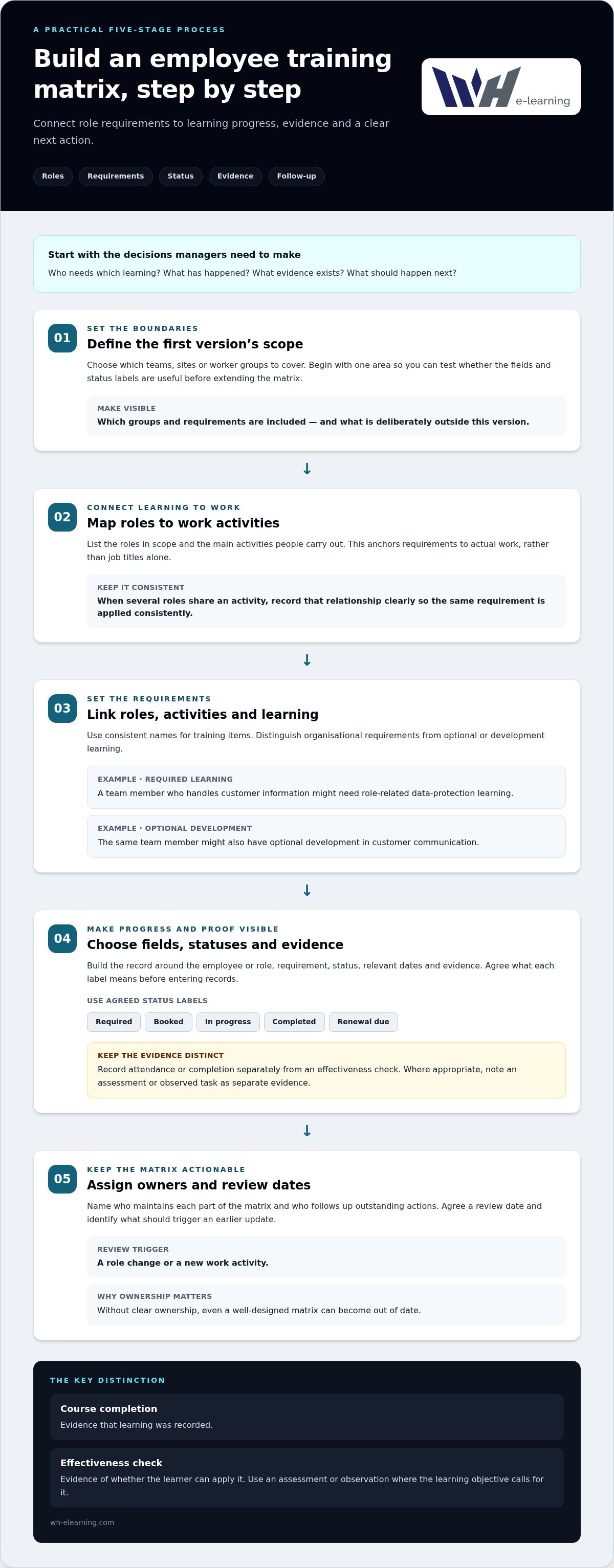
To work out how to create an employee training matrix, build it around the decisions managers need to make: which learning applies to each role, what has happened, what evidence exists and what should happen next. Start with a manageable scope, then expand the matrix as your process becomes clearer.
- Define the first version’s scope. Decide which teams, sites or worker groups it will cover. Starting with one area makes it easier to test whether the fields and status labels are useful before applying them more widely. Note any groups or requirements deliberately left outside this first version.
- Map roles to work activities. List the roles in scope and the main activities people carry out. This connects the matrix to actual work rather than job titles alone. If several roles share an activity, record that relationship clearly so the same requirement is applied consistently.
- Map roles, requirements and training needs. Link each learning requirement to the roles or activities it supports. Use consistent names for training items, and distinguish organisational requirements from optional or development learning. For example, a team member who handles customer information might need role-related data-protection learning, alongside optional development in customer communication.
- Choose the fields, statuses and evidence. Include the employee or role, requirement, status, relevant dates and evidence. Agree what labels such as “required”, “booked”, “in progress”, “completed” and “renewal due” mean before entering records. Add an effectiveness-check field where appropriate, and record an assessment or observed task separately from attendance.
- Assign owners and review dates. Name who maintains each part of the matrix and who follows up outstanding actions. Agree a review date and identify what should trigger an earlier update, such as a role change or new work activity. Without clear ownership, even a well-designed matrix can become out of date.
Course completion is evidence that learning was recorded; an effectiveness check is evidence of whether the learner can apply it. Keep those records distinct. A completed online course, for example, may document participation, while a separate assessment or observation checks understanding or practical performance where the objective calls for it. Not every learning item needs the same kind of assessment.
Before rolling out the matrix, review a few entries with the managers who will use it. Check that each requirement has a clear role link, statuses are understood consistently and evidence points to a record someone can find. Then use the matrix to plan follow-up, not just report activity. Where a gap calls for structured learning, workplace training courses can support a practical next step, with any necessary assessment recorded separately.
Which training matrix format works best: spreadsheet, role-based or training system?
The right format depends on how many roles and requirements you need to track, how often information changes and who needs to act on it. A spreadsheet can be a sensible starting point, while a role-based structure makes shared requirements easier to manage. A training system may provide clearer progress and compliance-status reporting as records grow. These approaches can also work together: a more sophisticated format isn’t automatically a better one.
Use this comparison to weigh the practical trade-offs:
| Format | Ease of setup | Visibility and reporting | Update effort | Best suited to |
|---|---|---|---|---|
| Spreadsheet grid | Quick to create and adapt | Easy to scan when the scope is small; reporting is often manual | Updates and version control need attention | A small, clearly defined group or an initial trial |
| Role-based matrix | Needs role and requirement mapping first | Shows shared requirements across roles; employee-level details may need a linked record | Changes to roles or requirements need consistent updating | Organisations with recurring requirements across several roles |
| Training-system records | Requires a suitable setup and defined data | Administrative features can support progress and compliance-status tracking across larger groups | Can reduce repeated manual tracking, but still needs oversight | More complex programmes with frequent updates or regular reporting |
As the matrix expands, avoid forcing every detail into one enormous grid. Keep a readable summary for managers, with structured employee-level records behind it. This lets people see priorities quickly without losing the dates, evidence and individual status details needed for follow-up. Use the same role names and status definitions in both the summary and detailed records.
When is a spreadsheet a sensible starting point?
A small spreadsheet is quick to set up when you’re testing a defined scope with a limited number of roles and requirements. Keep one agreed version, control who can edit it and make update responsibility clear. Trial the layout with one team before wider use. Check whether managers can find outstanding actions and maintain accurate records without duplicating entries.
When should you consider a training system?
Consider a more structured system if updates are repeatedly entered in different places, managers struggle to produce a current view or records are becoming difficult to maintain. Administrative features included with corporate training licences can support progress and compliance-status tracking; this is distinct from purchasing standalone LMS software. At organisational scale, align the record-keeping approach with customised corporate training programmes, so delivery and tracking support the same learning priorities.
When deciding how to create an employee training matrix, choose the simplest format that gives the right people a reliable view and can be maintained as requirements change. Consider the workload as well as the layout: a clear-looking format that depends on constant manual reconciliation may not stay useful.
How to keep the matrix accurate, prioritised and useful over time
A matrix stays useful when someone owns the information and managers know what to do with it. Treat it as a working record, not a document to complete once and file away. Set review dates that fit your training cycles and the pace at which roles, procedures or learning requirements change. Build maintenance into the process from the outset.
Assign ownership and set review triggers
Separate responsibility for updating records from responsibility for validating requirements. A training administrator might record completions, while a role manager confirms which learning applies to their team. Make clear who follows up overdue actions and who approves changes to requirements. Schedule routine reviews, then update affected entries sooner if a role changes, a procedure is revised or a course is completed. Because a change to one activity may affect several roles, check the full role mapping rather than editing only one employee’s record.
Turn gaps into a trackable action plan
A gap becomes manageable when it has a next step. For each outstanding requirement, record an owner, the action needed and a target date. Distinguish learning that is overdue from learning that’s required but not yet scheduled; those statuses call for different follow-up. Prioritise by considering the role requirement, the operational risk of the gap and when the learning is needed. There’s no universal score for every organisation, so make the reasoning clear and consistent.
For example, an overdue role-related requirement linked to a task an employee is due to carry out may need earlier attention than optional development learning. The relevant manager can arrange the learning, while the record owner updates progress and evidence. Close the action after reviewing the completion record and, where appropriate, separate effectiveness evidence such as an assessment or observed task.
Keep reports factual. Show which requirements are outstanding, booked or in progress, and what action and target date have been agreed. State the reporting period and groups covered so readers can understand the snapshot. A completed course record shows that learning was recorded, but it doesn’t by itself prove competence or guarantee compliance. Use wording that reflects what the evidence actually demonstrates.
Workplace compliance e-learning can be one way to address gaps identified in your review. To match a priority gap with relevant learning, explore workplace training courses across compliance, HR and health and safety.
Turn matrix gaps into employee training with a manageable next step
A prioritised gap only becomes useful when it leads to a clear learning action. Choose an option that addresses the requirement, suits how the employee can access learning and includes appropriate follow-up. This step turns the matrix from a record of outstanding needs into a practical plan for building capability.
Match the learning action to the requirement
First, identify what the learning needs to achieve. A knowledge-based requirement may be addressed through relevant course content, while a task involving practical ability may also call for an assessment or observation. Don’t assume the same delivery method or evidence suits every requirement. Record the planned learning and any separate effectiveness check to create a clear route from identified gap to follow-up.
Consider access as well as subject matter. Employees may need to learn across different devices, or benefit from captions or learning in another language. Video-based courses can offer flexibility for distributed teams, while in-house face-to-face training may suit learning that benefits from direct interaction. For safety-related requirements in your matrix, workplace safety training courses can help inform the learning action you plan.
Set the follow-up before marking the gap as resolved. Depending on the objective, this might mean checking the completion record, arranging an assessment or asking a manager to observe a relevant task. Close the action only after reviewing the evidence required for that specific learning need.
Use course access and progress tracking to support delivery
For a specific learning need, an individual can enrol on a relevant course. Organisations can use bulk training licences for staff groups, with administrative features to track employee progress and compliance status. This helps managers see recorded progress alongside matrix requirements, without treating course completion alone as proof of competence or a guarantee of compliance.
WH eLearning provides more than 100 video-based workplace courses across business compliance, HR and health and safety. Courses include closed captions and can be machine-translated into more than 25 languages. These options can help you plan access to learning for different employees, while the matrix records the requirement, progress and any additional check that’s appropriate.
For safety-related requirements, use occupational safety and health training guidance to consider how a learning action fits the requirement you’ve identified. Keep the decision connected to the role and the work, rather than assigning a course simply because it’s available.
The practical purpose of learning how to create an employee training matrix is to connect each gap to relevant learning, a clear owner and evidence that matches the objective. To put a learning action in place, explore workplace training courses across health and safety, HR and business compliance.
Make your next training decision count
A training matrix creates value when it leads to a timely, relevant action. Choose one priority gap, agree who will address it and decide what evidence will show whether the learning has met its objective. Use what you learn from that first action to refine your approach. The best answer to how to create an employee training matrix is one your organisation can keep using as roles and learning needs evolve.
Learning should fit the requirement and the people taking part. WH eLearning offers workplace courses across compliance, HR and health and safety, with corporate licences that help organisations track progress. Use the matrix to connect suitable course learning with any additional assessment needed, rather than treating a completion record as proof of competence.
Ready to turn a priority gap into a learning action? Explore workplace training courses with WH eLearning across health and safety, HR and business compliance.
Frequently Asked Questions
Is an employee training matrix a legal requirement in the UK?
No, UK organisations aren’t required to use one prescribed employee training matrix format. However, employers may have responsibilities to provide appropriate instruction or training for particular work and risks. A matrix can help organise relevant records, but it doesn’t replace those responsibilities or establish that learning was effective. Requirements vary by activity and sector, so check current authoritative guidance that applies to your circumstances before relying on a particular record-keeping approach.
Can a training matrix include agency workers and contractors?
Yes, a matrix can include agency workers and contractors where their tasks or site access make relevant learning necessary. For example, a contractor attending a site induction could be recorded for the period of their assignment. Agree who maintains the entry, who supplies supporting evidence and when access ends. Keep only information needed for this purpose, and make handovers clear if a person moves to a new assignment or location.
Who should be responsible for maintaining an employee training matrix?
Give one named person responsibility for coordinating the record, but don’t expect them to know every role’s requirements. Managers can flag changes in duties and follow up with employees, while subject specialists validate learning requirements and evidence. Make approval responsibilities clear too. For example, HR might coordinate updates, a department manager might confirm a role change, and a relevant specialist might review whether the associated training entry needs amending.
Can informal or on-the-job training be recorded in a training matrix?
Yes, record informal or on-the-job learning if it supports a relevant requirement and the entry explains what happened. For instance, note the activity, date and person who delivered or supervised it, then add observation or assessment evidence where appropriate. This makes the record useful to someone reviewing it later. Don’t describe informal learning as equivalent to a formal course unless that equivalence has been assessed and is appropriate for the requirement.
How can a training matrix cover employees working across several sites?
Use shared names for roles and learning items across sites, then identify local requirements only where they differ. For example, record a common induction consistently, with a separate site-specific entry if a location has distinct processes. Give local managers a route for reporting changes, and check records when staff transfer between locations. This helps prevent duplicate entries or conflicting statuses while preserving visibility of genuine site differences.
How should employee information in a training matrix be protected?
Limit access to people who need the information to administer learning or manage relevant work. Keep the fields focused, store and share records according to your organisation’s data-protection procedures, and review permissions when someone’s responsibilities change. A report for a wider audience may need only totals or outstanding actions, not individual details. Align storage, access and retention practices with current organisational policy and applicable requirements for the way the matrix is used.
Does a training matrix need to include every course an employee has completed?
No, include learning that has a clear purpose for the matrix, such as a role, site, task or development requirement. A record of every course can make priority items harder to find. For example, a team may track role-related learning in its matrix and retain unrelated professional development in a separate learning history. Set a consistent inclusion rule, then apply it across teams so similar records are treated in the same way.


