

What if the best corporate training plan isn’t a single course for everyone, but a practical mix shaped around different roles and working patterns? Choosing customised corporate training programs can feel complex when teams have varied learning needs, schedules, locations and language requirements. A generic course list may miss the mark, while limited visibility of participation and completion makes progress harder to manage.
A tailored approach doesn’t have to mean building every course from scratch. It can start with selecting relevant topics and delivery methods, then setting clear ways to monitor learner progress and compliance status.
This guide explains how to shape a corporate training programme around your workforce, from identifying role-specific learning needs to choosing between online courses and in-house, specialist-led sessions tailored to industry sectors. You’ll also learn what to look for in organisational access and progress tracking, and how features such as closed captions and machine translation into more than 25 languages can support a diverse workforce. The aim is a manageable programme that fits the way your organisation works and makes progress easier to see.
Key Takeaways
- Customisation means aligning learning choices with workforce needs, not necessarily creating bespoke courses or software.
- Use role-specific learning needs to decide which topics belong in each learner’s training plan.
- Compare customised corporate training programs across relevance, delivery, accessibility, progress tracking and administrative effort.
- Build a manageable process: assess needs, group learners, assign courses and review progress.
- See how WH eLearning’s course library and organisational access can support a practical training approach.
Why customised corporate training programmes need to fit the work
One organisation can bring together office-based staff, operational teams, managers and people working across different locations. Their responsibilities, exposure to workplace risks and existing knowledge may vary considerably. Assigning everyone the same course can leave some employees learning material they already know, while others miss training that’s relevant to their role.
A customised corporate training programme aligns learning topics, delivery and progress measures with the needs of particular roles and the organisation’s working environment. That doesn’t automatically require bespoke software or newly written courses. It can begin with a thoughtful selection of existing learning, planned around clear workforce needs.
This is a practical business decision, not simply a course-selection exercise. Relevant learning helps employees see how a topic connects to their work. Accessible delivery makes it easier for people with different schedules, locations and language needs to take part. Visible progress gives administrators a clearer picture of participation and completion, supporting more organised oversight.
Corporate education is a broader concept that connects learning with employee development and organisational change. For buyers, the useful distinction is that a training programme turns that broad ambition into a manageable plan: who needs to learn what, how they can access it, and how progress will be reviewed.
What does a customised corporate training programme include?
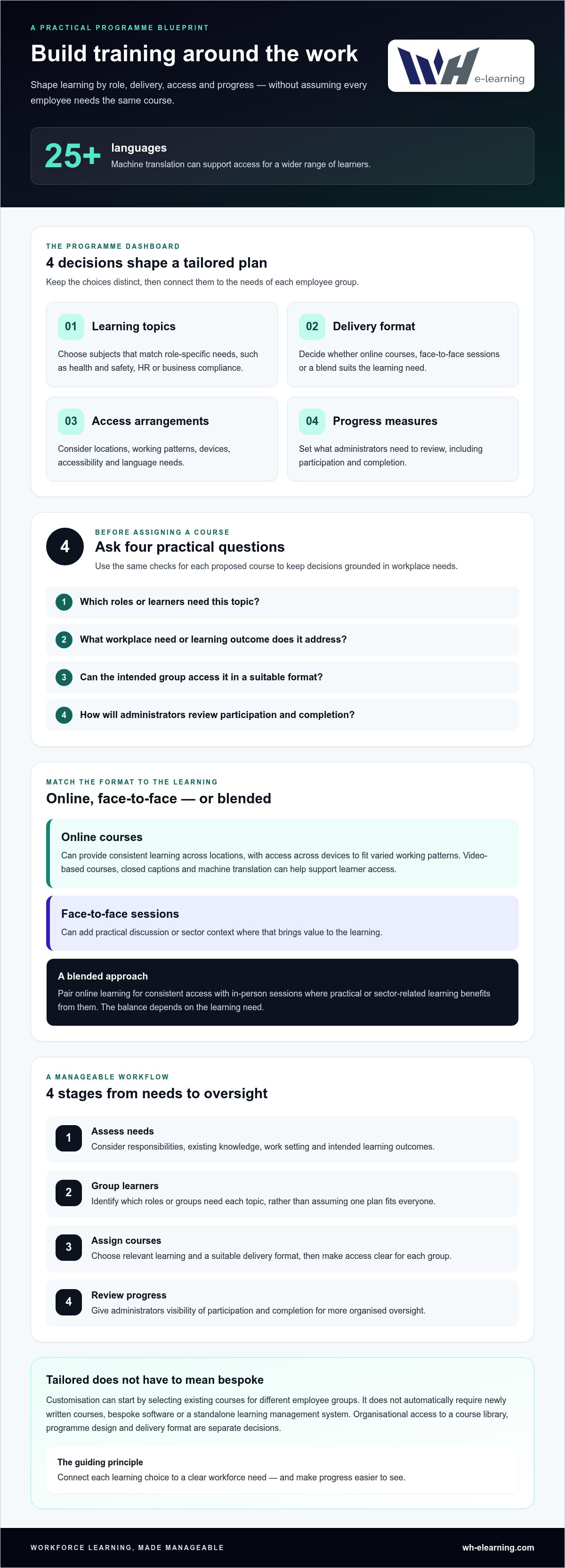
Separate the plan into four decisions: learning topics, delivery format, access arrangements and progress measures. For example, an organisation might assign health and safety learning to one group and HR or business compliance topics to another. It could use online courses for distributed teams and face-to-face sessions for practical, sector-related learning.
Customisation can mean selecting relevant courses for different employee groups. Programme planning matches learning to people and outcomes; it isn’t the same as commissioning a new course or purchasing a standalone learning management system (LMS). Keeping these decisions distinct helps buyers focus on what employees need to learn and how administrators will manage delivery.
Which workplace needs should shape the programme?
Start with the work itself. Consider each group’s role responsibilities, existing knowledge, work setting and intended learning outcome. A course is easier to justify when there’s a clear connection between its subject and a workplace need, rather than simply because the topic sounds broadly useful.
Then consider how people can take part. Teams may be spread across locations, work different patterns or have accessibility and language needs. Check that the chosen format fits those realities, and define what progress administrators need to see. Use these questions to assess each proposed course:
- Which roles or learners need this topic?
- What workplace need or learning outcome does it address?
- Can the intended group access it in a suitable format?
- How will administrators review participation and completion?
These questions give buyers a consistent basis for shaping customised corporate training programs without assuming every employee needs the same content or delivery. They also provide a clear starting point for comparing course options and building an organisation-wide plan.
How to combine course content, access and delivery
Once you’ve identified who needs to learn what, decide how to deliver it. A blended approach can pair online courses for consistent learning across teams with face-to-face sessions where practical discussion or sector context adds value. The right balance depends on the learning need, not on a rule that every employee must use the same format.
Course access gives employees learning materials, programme design assigns the right learning to the right groups, and delivery format determines how they take part. Keeping these decisions separate clarifies what an organisation needs. Bulk licensing, for example, provides organisational access to a course library; it isn’t the same as purchasing standalone software or commissioning bespoke course content.
When does online learning suit employee training?
Online learning can help employees in different locations access a consistent course without requiring everyone to attend a session at the same time. Access across devices gives teams flexibility to fit learning around varied working patterns. Video-based courses offer a clear format, while closed captions and machine translation into more than 25 languages can support access for a wider range of learners.
For administrators, bulk access to a course library can make it easier to assign relevant topics across employee groups. It can provide a consistent starting point for learning while leaving room to choose different courses for different roles. This approach suits topics that can be studied independently, such as business compliance, HR or health and safety.
Plan the learner journey as well as the course choice. Decide which groups need access, how they’ll find their assigned learning and what progress administrators need to review. These arrangements help turn a collection of courses into a practical programme, without confusing course-library access with buying an LMS.
When can in-house training add practical value?
Some learning benefits from a shared, face-to-face setting. In-house sessions delivered by industry specialists can be tailored to specific industry sectors, adding practical context and giving participants the opportunity to discuss how a topic relates to their work. This can be particularly relevant when the learning need is closely connected to workplace activity.
In-person training can complement online learning rather than replace it. For instance, employees might use online courses for consistent foundational topics, then take part in a specialist-led session focused on practical, sector-related learning. The right mix depends on the intended outcome, employees’ work settings and how they can take part. Organisations considering in-house health and safety training can use those needs to guide the format.
To shape a workable mix, map each learning need to its best-fit delivery method. Online courses can support consistent access across locations; face-to-face sessions can provide specialist context where it matters. Explore online workplace training courses as one way to build a course mix around organisational learning needs.
How to compare customised corporate training programmes
A useful comparison starts with the workforce need, not the size of a course catalogue. Assess each option against the roles to be trained, the learning outcomes you’ve identified and the way employees will access learning. This helps distinguish a broad range of topics from a programme that genuinely fits your organisation.
Use the same criteria for each option. A simple comparison table can bring the practical differences into view:
| Criterion | What to assess |
|---|---|
| Relevance | Do course topics connect clearly to specific roles and identified learning needs? |
| Delivery | Can learning be delivered online, face to face or through a suitable mix? |
| Accessibility | Can the intended workforce access courses on their devices, with features such as captions or language support where useful? |
| Tracking | Can administrators view learner progress and compliance status? |
| Administrative effort | How practical is it to assign learning, review participation and follow up with employees? |
Use the answers to identify strengths and gaps rather than treating a high score in one area as proof that the whole programme is suitable. A wide course selection, for example, is valuable only if the relevant topics can be mapped to the right groups.
Which course and access features deserve attention?
Check that the available topics match your learning plan. Relevant health and safety, HR and business compliance courses can support different organisational needs, but each assignment should have a clear purpose. A course library with more than 100 online courses offers breadth; your comparison should still focus on whether its content fits the roles and outcomes in scope.
Then consider how employees will access learning. Device access, video-based delivery, closed captions and machine translation into more than 25 languages may help address practical barriers for different workforces. Compare these features with your existing workplace compliance training plans, including who needs each topic and how learning fits into current arrangements. Language support is most useful when it helps the intended learners engage with the material.
How should buyers assess administration and oversight?
Look for clear administrator visibility of employee progress and compliance status. This helps teams see where learners have completed assigned courses and where follow-up may be needed. Tracking supports oversight, but it doesn’t guarantee participation, completion or a particular learning outcome. Plan who will assign courses, review the available information and remind staff about outstanding learning.
For organisations with employees who use different languages, consider how multi-language e-learning courses fit the workforce and wider training plan. Compare the practical work involved in assigning and monitoring learning, not just the features on offer. These criteria give buyers a grounded way to assess customised corporate training programs without relying on unsupported provider rankings or assuming one format suits every team.
How to plan a corporate training programme step by step
A clear plan turns training needs into learning employees can access and administrators can oversee. Keep it practical: define the need, identify the learners, choose the learning and delivery, then review progress. Grouping people by role or shared learning need can make assignments easier to understand and manage.
- Assess the need. Identify the work-related knowledge or learning outcome the organisation wants to address. Be specific about the roles involved and why the learning is relevant to them.
- Group learners. Organise employees by role, responsibility or learning need where that makes course assignments clearer. Avoid assigning every topic to everyone by default.
- Choose relevant learning. Match each group to suitable courses across health and safety, HR or business compliance. Consider specialist-led, sector-related sessions where practical learning would support the intended outcome.
- Set delivery and access. Decide how each group will take part, taking account of work patterns, locations and accessibility needs. Record an intended completion period that’s workable for the team.
- Review and adjust. Monitor enrolment, completion and progress against the learning plan. Use what the tracking shows to identify follow-up needs or changes to future course assignments.
These indicators show how the programme is progressing; they don’t guarantee completion or prove that a particular outcome has been achieved. Review them alongside the original need, and adjust the plan if roles, priorities or access requirements change.
What should the programme plan record?
Keep a simple record of learner groups, assigned topics, delivery format and intended completion periods. Name who is responsible for administration, communicating expectations to learners and following up on progress. Decide when progress will be reviewed and what might prompt an adjustment, such as a group needing a different course or a delivery format that better fits its work.
How can the programme support different teams?
Use course-library topics to create relevant learning plans across health and safety, HR and compliance, rather than treating the catalogue as a one-size-fits-all curriculum. Online learning can support access across locations, while specialist-led sessions tailored to specific industry sectors can add practical context where it’s useful. A growing organisation can keep the same planning principles while adapting learner groups and assignments as workforce needs change.
For each group, note the topic, reason for assignment, delivery choice and progress indicator. This gives administrators a consistent way to follow the plan without making the process more complicated than it needs to be. It also helps teams see how their assigned learning connects with the work they do.
Organisations planning bulk access can explore WH eLearning’s corporate course access as part of this process, with administrator tools for tracking learner progress and compliance status.
How WH eLearning supports customised corporate training programmes
A well-planned programme needs learning that fits employee roles, a delivery approach people can use and a straightforward way to review progress. WH eLearning offers online courses and in-house face-to-face training. Organisations can select relevant learning and delivery options without assuming that every course needs to be created from scratch. This makes it easier to shape customised corporate training programs around workforce needs and practical administrative requirements.
What can organisations include in their learning approach?
WH eLearning’s library includes more than 100 online courses across health and safety, HR, business compliance and other workplace topics. Organisations can select courses that suit particular learner groups, then use bulk organisational access through corporate licensing. Administrator tools provide visibility of learner progress and compliance status, helping those responsible for training oversee assignments and follow-up.
The online courses are video-based and can be accessed on different devices. Closed captions and machine translation into more than 25 languages can support access for employees with varied needs. These features can help organisations plan for a distributed workforce while keeping course selection focused on the topics relevant to each group.
Where a programme calls for practical, sector-related learning, organisations can also arrange in-house face-to-face sessions delivered by industry specialists and tailored to specific industry sectors. This option can sit alongside online learning rather than replace it: use courses for relevant learning across teams and in-person sessions where specialist-led delivery fits the need.
What are the next steps for choosing a programme?
Before deciding on a learning mix, bring the essential details together. A short programme outline can help administrators connect organisational needs to course access and delivery choices:
- Learner groups: identify the roles or teams included, including any differences in work setting, language or accessibility needs.
- Learning topics: record the relevant subjects for each group and the workforce need each assignment addresses.
- Preferred delivery: decide where online courses fit and whether specialist-led, in-house sessions would add practical value.
- Progress visibility: set out what administrators need to monitor, such as learner progress and compliance status.
Use these criteria to assess how the available options fit your organisation. Bulk access to a course library can support learning across different groups, while administrator tools help make progress visible. Online courses provide a delivery option for employees in varied locations; in-house sessions offer a practical, sector-related alternative where appropriate.
With learner groups, topics, delivery preferences and tracking needs clearly set out, you’ll have a practical starting point for choosing an approach. Explore corporate training with WH eLearning to consider course access and training options for your organisation.
Turn your training priorities into a clear next step
The strongest customised corporate training programs begin with a focused decision: which workforce need should the organisation address first? Use that priority to define the learners, the intended outcome and how you’ll review progress. Starting with a clear scope gives your team a practical foundation, rather than a long list of courses without a shared purpose.
Keep the plan useful as work changes. Set a review point, consider what the progress information tells you, and adjust learner groups or course assignments when priorities shift. This makes training easier to manage as an ongoing part of workforce development, not simply a task to complete and forget.
When you’re ready to turn your priorities into an organisational learning plan, explore how WH eLearning’s training options could fit your needs. Explore corporate training with WH eLearning and take a practical first step towards a programme that works for your people.
Frequently Asked Questions
What are customised corporate training programmes?
They’re learning plans organised around an organisation’s roles, needs, delivery preferences and ways of reviewing progress. For example, managers and frontline employees may need different topics even if they work for the same organisation. Customisation doesn’t automatically mean commissioning new courses: it can involve selecting suitable existing learning and assigning it thoughtfully. The aim is to connect each learning activity to a clear workforce purpose.
How do you customise a corporate training programme?
Start by identifying the workplace need and the employees it affects. Group learners by role or shared learning requirement, then select topics that address those needs. Choose a delivery approach that fits employees’ work patterns and access requirements. Finally, decide how you’ll review enrolment, completion and progress, and who will follow up. This gives customised corporate training programs a clear structure without making planning unnecessarily complicated.
Can online courses be part of a customised employee training programme?
Yes. Online courses can form part of a tailored programme when you select and organise them for the right employee groups. For instance, new starters might be assigned introductory workplace topics, while managers receive learning relevant to their responsibilities. The courses themselves don’t need to be newly written for your organisation. Programme fit comes from linking each course to a defined need and arranging access and follow-up clearly.
What is the difference between corporate training and an LMS?
Corporate training is the learning employees undertake, such as health and safety, HR or business compliance courses. A learning management system (LMS) is software designed to organise and manage learning activities. The terms describe different things: one is the training content and delivery, the other is a technology category. Organisations can arrange corporate course access with administrator tools without buying standalone LMS software.
How can a business track employee training progress?
Use administrator tools that show learner progress and compliance status, then build a regular review into the training plan. For example, an administrator can identify employees who haven’t completed an assigned course and arrange an appropriate reminder or follow-up. Decide in advance who reviews the information and how often. Tracking provides visibility for oversight, but it doesn’t by itself guarantee completion or demonstrate a particular learning outcome.
Can corporate training support employees who speak different languages?
It can. WH eLearning courses include machine translation into more than 25 languages, which can support access for employees who use different languages at work. Organisations can consider this alongside other access needs when planning learning for their teams. Machine translation is a translation feature, so avoid assuming it guarantees a particular level of accuracy or that every employee will have the same language preference.
Is face-to-face training better than online corporate training?
Neither format is automatically better; the right choice depends on the learning need and work setting. Online courses can help employees access consistent learning across different locations, while face-to-face sessions may suit practical discussion and sector-related context. A programme can use both: online learning for topics suited to independent study, with an in-house, specialist-led session where direct practical learning is useful.


